
Minecraft inventory management is easier when you separate three jobs: keep urgent tools on the hotbar, arrange materials into predictable groups, and move supplies you do not need into chests. The inventory is not unlimited, so a good system saves time during mining, fighting and construction. This guide explains player inventory versus crafting grids and Creative inventory, plus practical ways to avoid losing items.
Inventory basics: slots and the hotbar
The player inventory contains a limited number of storage slots plus a nine-slot hotbar for frequently used items. Most common blocks and resources stack up to 64 per slot, while many tools, armor pieces and special items do not stack. Some items have smaller stack limits.
Because limits differ, do not assume a full inventory can hold the same total number of swords, eggs and stone blocks. Free slots before starting a long resource-gathering trip.
How to open the inventory
On Minecraft Java Edition, use the inventory key assigned in your controls, typically E by default. On Bedrock, use the interface control for your device, including a controller button or on-screen touch icon. If a shortcut differs, check the key-bindings and accessibility settings.
The inventory screen includes your personal crafting grid, equipped armor and accessible items. It is separate from the larger crafting table grid, which requires a placed block.
Best hotbar layout for Survival
Place a weapon, pickaxe, axe, shovel and food where your fingers or controller selection can reach them quickly. Reserve a slot for blocks and one for an emergency item such as a water bucket in the Overworld. There is no universal best order; consistency is more valuable than copying someone else’s hotbar exactly.
When you change the layout, practice switching tools in a safe area so you do not pull out a block instead of a weapon during combat.
Fast item movement and stack handling
Inventory interfaces provide shortcuts for quickly moving items and splitting stacks, but the exact controls vary across Java, Bedrock, keyboard and controllers. Java Edition commonly supports shift-click for fast item transfer and mouse interactions for splitting or distributing stacks.
Look at your inventory controls and current version before memorizing an older video shortcut. Do not practice unusual shortcuts while holding rare items near lava.
Inventory versus crafting table
The personal inventory includes a compact 2×2 crafting grid for simple recipes, including turning logs into planks. Placing a crafting table opens a 3×3 crafting interface for recipes that need more positions.
This distinction explains why a pickaxe recipe will not fit into a 2×2 grid. A crafting table is inexpensive and worth carrying when you expect to make tools during a trip.
Organize storage at your base
Use separate chests or labeled containers for stone and dirt, ores, wood, farming, tools and valuables. Place frequently used categories close to crafting and smelting stations. A consistent layout is easier to maintain than one enormous mixed chest.
A double chest gives more storage than a single chest; avoid blocking access to containers with solid blocks or awkward furniture. For repairing tools, see our anvil and repair guide.
Creative inventory differences
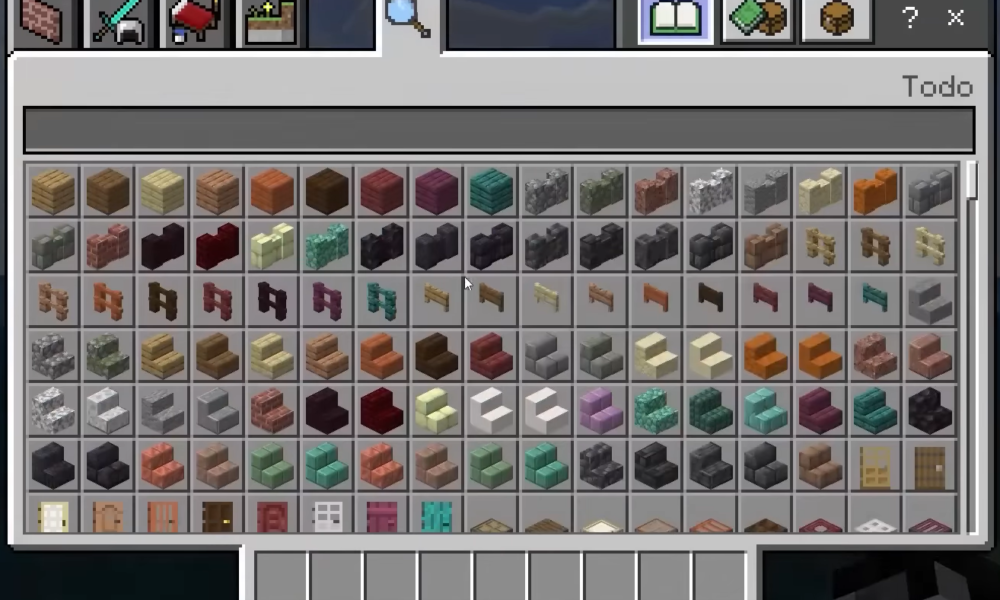
Creative Mode provides a wide catalog of blocks and items and allows players to retrieve building materials without normal Survival gathering. The search and category tabs are designed for item discovery. The pictured screenshot shows a Bedrock Creative inventory; menu layouts may differ across updates.
Creative Mode is suitable for testing designs before recreating them in Survival. Our Creative Mode guide explains how the mode works.
Avoid losing important items
Before deep mining or difficult combat, deposit spare diamonds, tools, and nonessential resources in a chest. Carry only what the outing requires. If your inventory fills up, prioritize rare drops and building materials you cannot easily replace.
An Ender Chest or Shulker Box can become useful later in the game, but they require additional progression. Start with ordinary storage and predictable sorting first.
Related Minecraft guides
For crafting from your hotbar supplies, see our Minecraft crafting table guide. If your inventory fills with mined gear, our anvil and equipment repair guide explains how to maintain useful tools.
Frequently asked questions
How many hotbar slots does Minecraft have?
The player hotbar contains nine item slots.
Why don’t my tools stack?
Many tools are non-stackable, unlike common materials such as cobblestone.
Can I craft in my inventory?
Yes, with the personal 2×2 grid, but larger recipes require a crafting table.
Is Creative inventory the same as Survival inventory?
No. Creative Mode provides direct access to items and different interface categories.
What is the safest way to keep rare resources?
Move nonessential valuables to a protected chest before dangerous activities.
Image credit: Xbox México, Wikimedia Commons, declared CC BY 3.0. File page notes independent license review pending.

Other Articles

Hide the Taskbar in Windows 11: Auto-Hide and Fixes
Minecraft Frozen Ocean: Icebergs, Ocean Mobs and Base Ideas