
Quick answer (verified October 9, 2026): If Steam game downloads seem slow, first compare the same speed units. Steam often shows MB/s (megabytes per second), while internet providers advertise Mb/s (megabits per second). One byte equals eight bits: 10 MB/s represents roughly 80 Mb/s, before other overhead. If the actual rate is still unexpectedly low, check your Steam Download Region, any configured bandwidth limit and local disk activity.
Why internet speed tests and Steam show different numbers
A speed test advertising 100 Mbps does not mean downloads will necessarily show 100 MB/s. Dividing 100 megabits by eight gives an ideal transfer rate near 12.5 megabytes per second, before protocol overhead or competing traffic. Valve highlights this conversion in its official slow-download guide. Compare like with like before assuming your ISP or Steam is throttling an account.
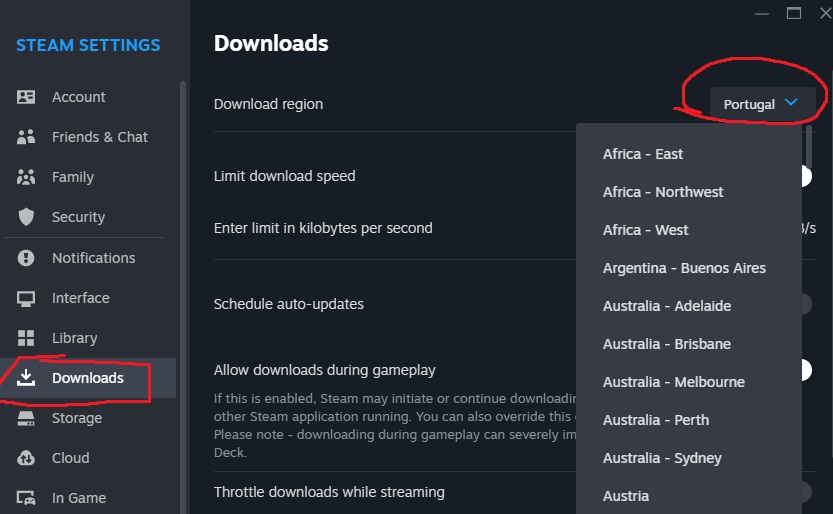
Change the Steam Download Region
- Open Steam and choose Steam → Settings.
- Select the Downloads section.
- Locate Download Region and choose a geographically nearby option.
- If that region is overloaded, try another nearby region rather than selecting one on the opposite side of the world.
- Resume the download and compare speeds during a similar time window.
Valve explains that a nearby content server may be slow or overloaded. Switching between a few sensible regions can test whether the issue is specific to a download server, but it does not override your connection’s physical speed or fix a damaged network cable.
Check Steam’s download speed limiter
Under Steam Settings → Downloads, check whether a speed limit has been configured. A deliberate cap is useful when someone else on the same network is working or gaming, but it can explain why Steam downloads stay at a very consistent maximum. Valve documents the Limit Download Speed setting. Change the cap only after considering shared network needs.
Why Steam pauses while using disk or verifying files
Steam downloads often contain compressed data and need disk space for unpacking and installation. On a slow or almost full drive, network activity may briefly fall while files are written. Check the download graph for disk usage as well as network transfer. Avoid repeatedly clearing a game’s installed files merely because the network line pauses for a few seconds.
Clear Download Cache only when appropriate
Valve’s update troubleshooting mentions Steam → Settings → Downloads → Clear Cache as one option for corrupted download data. This may restart queued download operations or require signing in again; it is not a universal speed booster. First rule out normal installation pauses and obvious connection limits. Do not delete the entire Steam library folder or game saves while testing cache behavior.
Check the connection and third-party software
Temporarily pause heavy streaming or other downloads on the local network and compare with a wired connection where practical. Valve notes that security or packet-filtering software can interfere with network transfers and server selection, but disabling security protections permanently is inappropriate. Use vendor-supported exceptions only when a specific interference has been identified. For connection failures, check Steam’s official support before changing router ports.
FAQ
Is 10 MB/s slower than a 100 Mbps internet plan?
It is in the same broad range after converting units; 10 MB/s equals about 80 Mbps.
Can changing Download Region improve Steam speed?
Sometimes, if a nearby content server is overloaded or poorly routed.
Why does Steam’s network speed drop while the disk is busy?
Decompression and installation can interrupt the visible network-transfer rate.
Does clearing the download cache erase purchased games?
No. The troubleshooting action is not a license deletion, though it can affect queued download state.
More help is available in our Gaming section. Sources: Valve slow downloads, speed limits, and download issues.