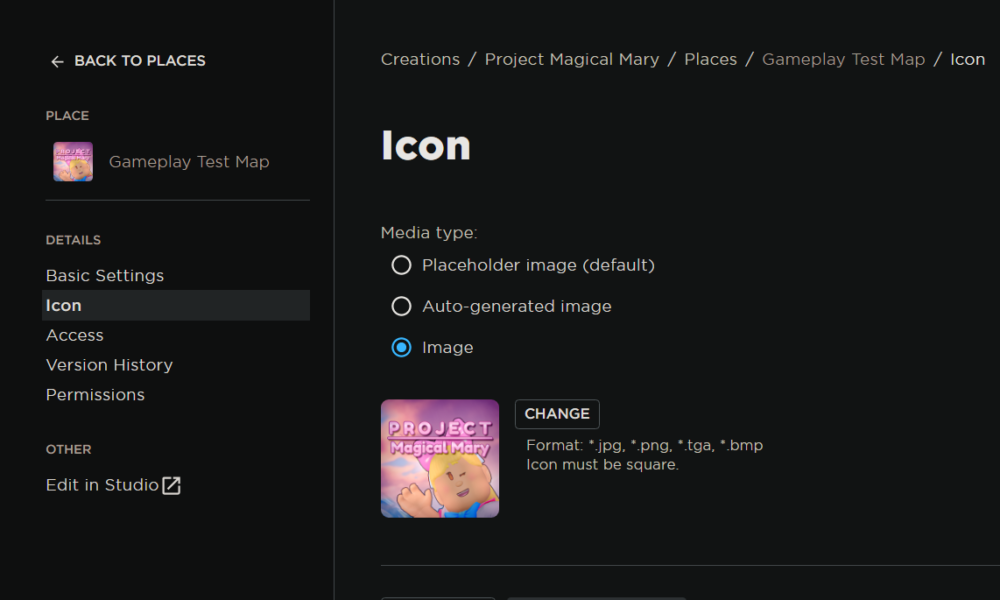

Quick answer (reviewed October 9, 2026): Roblox recommends creating a square experience icon at 512 × 512 pixels or higher for sharp display across its apps and website. Upload the icon through Creator Dashboard: open the experience, choose Places, select the starred start place, then select Icon and Change. The new image must pass Roblox moderation before the public will see it.
Game icon versus experience thumbnail
An experience icon is the compact square artwork that identifies your game. A showcase thumbnail is a separate promotional image that can present gameplay in a wider frame. Roblox’s official experience-icon guide explicitly distinguishes the two. Do not crop an unrelated cinematic screenshot and assume it will read clearly at a small size; the icon should be recognizable even in a search result.
Use a 512 × 512 square as a starting point
Design a high-resolution square canvas and test it at roughly 150 × 150 pixels before uploading. Roblox may display icons small in some discovery surfaces, so tiny text, detailed backgrounds and narrow outlines can become difficult to distinguish. A single central subject, readable shape and consistent visual identity make the image clearer than a crowded collage. A game about racing should not use a monster-horror icon purely to attract clicks.
Upload the icon through Creator Dashboard
- Sign in to Roblox Creator Dashboard using the game owner or a role with suitable access.
- Open the experience you want to change.
- Choose Places under Configure.
- Select the start place marked with a star.
- Open its Icon setting, select Image, then Change.
- Choose your square file, inspect the preview and click Save Changes.
These steps reflect Roblox’s current publishing documentation. If a creator guide tells you to change icons inside a game script, that does not match the usual dashboard image-setting workflow.
Why the icon may not update immediately
Roblox says all uploaded experience icons must pass moderation before they appear publicly. A pending review can therefore explain why the old icon stays visible even after Save Changes confirms a valid upload. Caching across discovery pages and app surfaces can also cause short-lived differences. Check Creator Dashboard for the asset status rather than repeatedly uploading the same image within minutes.
Make the image accurate and original
Use art you created or have rights to use. Screenshots from your own game can work if they show authentic gameplay, while images borrowed from unrelated popular games may violate rights or mislead players. Avoid prominent watermarks from other websites, fake reward claims and text that suggests the game offers items or mechanics that do not exist. A logo can be stylized, but it should still honestly represent the game.
Improve accessibility and discovery presentation
High-contrast silhouettes make small icons easier to perceive. Keep critical details away from the extreme edges because some surfaces may mask corners. Consider testing color variations with real players, not just asking whether a file looks good at full resolution. Match the icon’s art direction to the description and in-game visuals.
FAQ
What icon size does Roblox recommend?
A square icon of at least 512 × 512 pixels, according to Creator Hub.
Is the game icon the same as the thumbnail?
No. The icon is the square identity image; thumbnails are supplementary promotional media.
Why does my new Roblox game icon not show?
It may still require moderation or time to appear on public surfaces.
Can a group member update a game’s icon?
Only if the member has appropriate configuration permissions for that experience.
Find more creator articles in AVARIXO Gaming. Source: Roblox Creator Hub: Experience icons.

Other Articles