A Snapchat Streak means two friends are exchanging photo or video Snaps back and forth every day. Snapchat shows a fire emoji next to the conversation once a Streak starts, and the number beside it tells you how many days it has lasted. To keep a one-to-one Streak going, both people need to send a photo or video Snap to the other every day. Sending only a typed Chat message is not enough. If an hourglass appears, your Streak is at risk and both friends should exchange qualifying Snaps promptly.
These rules are confirmed by Snapchat’s official guide to how Streaks work and expire. This article also covers group Streaks, what the emoji number means, what to do if you lose a Streak, and how Snapchat’s in-app Restore option and pricing work. There is no legitimate third-party streak code or password-based recovery trick.
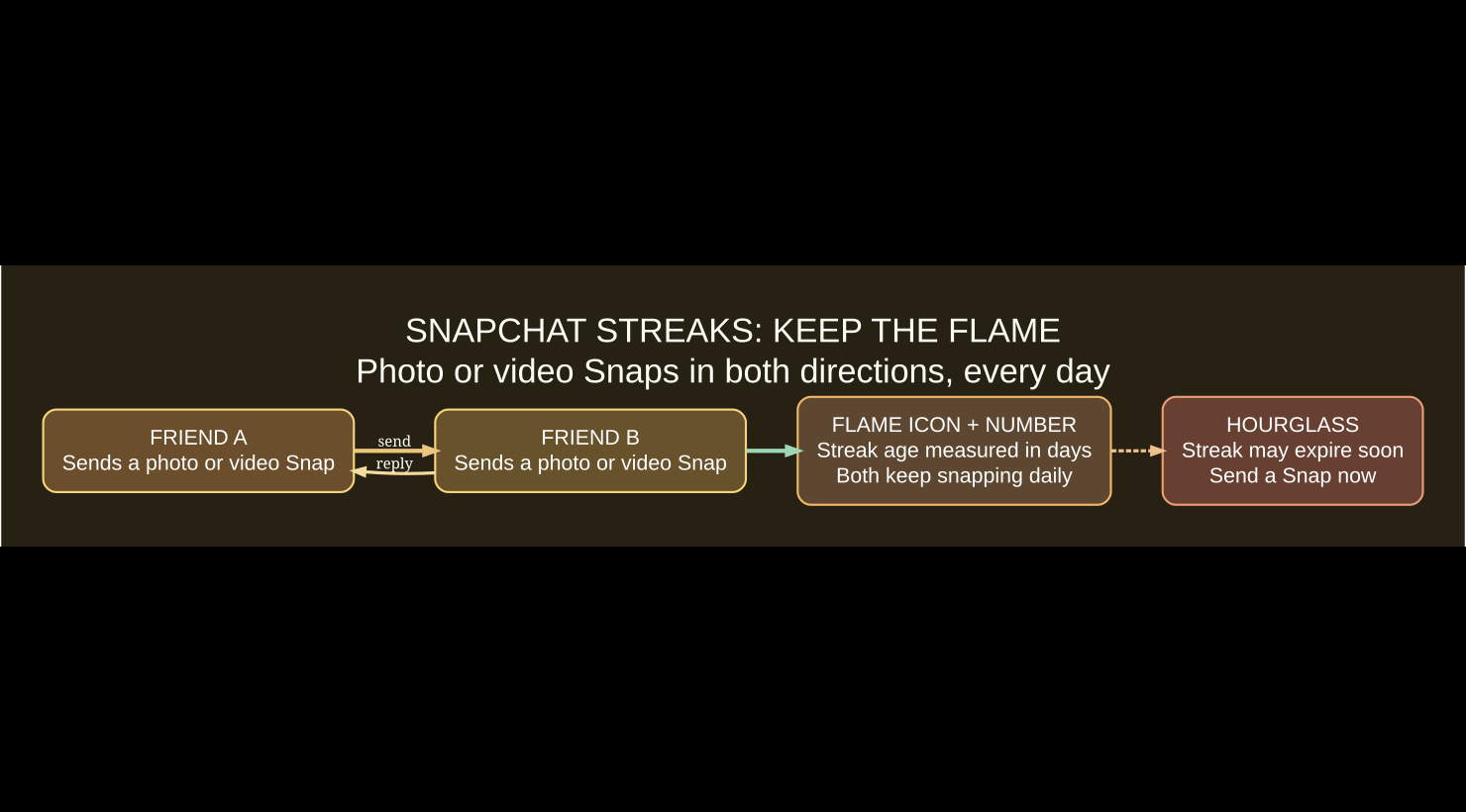
What does the Snapchat fire emoji mean?
The fire emoji indicates a conversation is on a Streak. The number beside it is the age of that Streak in days. If the number is 3, for instance, that indicates a three-day Streak — not three photo Snaps sent, three messages received, or three hours until expiration.
Snapchat’s support page explicitly says the fire symbol appears after friends have kept the daily exchange going long enough to form a Streak. A Streak is a shared activity between accounts; it is not the same as a private streak counter, Snapchat Score, a Story viewer count, or a sign that someone follows you.
How to start a Snapchat Streak
- Open Snapchat and find a friend in the Chat list, or add a friend first.
- Use the Snapchat camera to take a photo Snap or video Snap.
- Send that Snap directly to the friend.
- Ask the friend to send a qualifying photo or video Snap back.
- Repeat the exchange every day. A fire emoji appears once Snapchat recognizes a Streak.
- Continue daily exchanges to increase the number beside the flame.
Because both participants must take part, one user cannot reliably maintain a Streak alone by sending repeated messages. The way Snapchat measures a “day” can depend on its own backend timing, so the practical habit is to exchange Snaps regularly and avoid waiting until the last moment.
What counts toward a Snapstreak?
| Action | Counts toward a one-to-one Streak? | Explanation |
|---|---|---|
| Sending a photo Snap to the friend | Yes | A qualifying photo Snap contributes to the required daily exchange. |
| Sending a video Snap to the friend | Yes | A qualifying video Snap also contributes. |
| Receiving a photo or video Snap back | Yes | The other participant must reciprocate each day. |
| Typing a regular Chat message | No | Snapchat specifies a photo or video Snap, not ordinary text Chat. |
| Sending an emoji or sticker in Chat | No | That is not the required photo or video Snap exchange. |
| Posting a public Story | Not a substitute | A Story does not replace the friend-to-friend Snap exchange. |
A basic rule prevents most confusion: if you’re trying to protect an important Streak, use the regular camera to send a new photo or video Snap directly to your friend, and have them reply the same way. Do not rely on a text message or a Story as the only activity.
When does a Snapchat Streak expire?
Snapchat says a Streak expires when more than a day passes without a new qualifying Snap from everyone involved in the Chat. That is why users commonly describe Streaks as a “24-hour” routine. However, the app does not provide a universal reliable stopwatch in its support documentation. Don’t wait for the exact twenty-fourth hour to exchange Snaps; send them well before the deadline.
The hourglass emoji means Snapchat thinks the Streak is about to end. It is a warning to act promptly, not a public promise of a fixed remaining number of minutes. To save the Streak, both participants should send each other a photo or video Snap as soon as possible.
Group Streaks: do all members need to participate?
Snapchat says that most members of a Group Chat must send a photo or video Snap into that group every day to maintain a Group Chat Streak. That differs from a one-to-one Streak, where both people must participate. Sending text into the group does not replace qualifying Snaps.
Because the rule says “most members,” do not assume that one group member posting a photo is sufficient. Check the current group activity and Snapchat’s official Group Streak explanation, especially if your group has members in different time zones.
I lost my Streak. How do I restore it?
If a Streak disappears, open the conversation in Snapchat and look for a Restore button. If the Streak is eligible for restoration, the app will guide you through the recovery steps. Snapchat only offers this for a limited period after the Streak expires; a very old Streak may not be eligible.
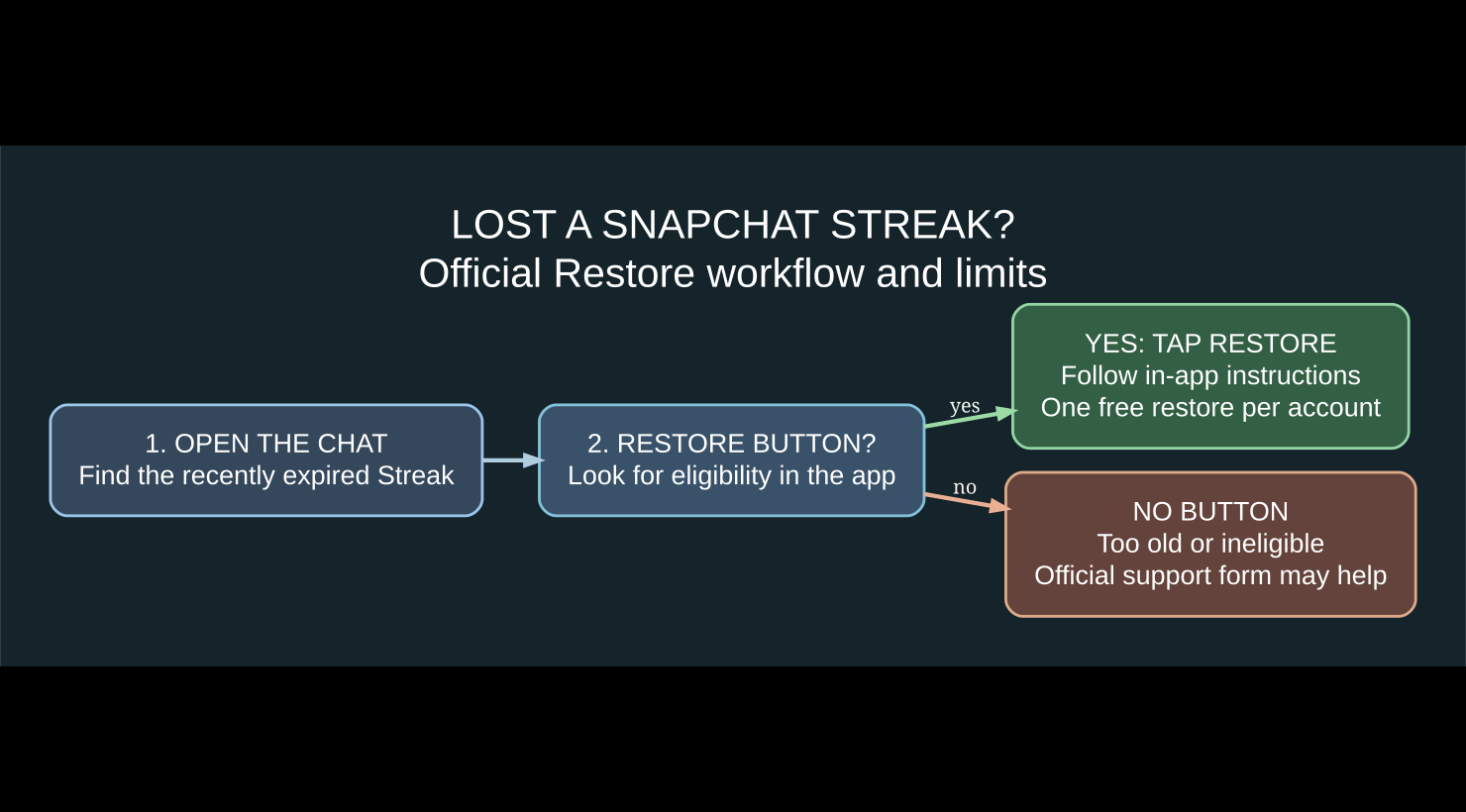
- Open your Chat screen in Snapchat.
- Find the person or group whose Streak recently expired.
- Look for the in-app Restore control next to the relevant conversation.
- Tap it if offered, then follow the confirmation and any price details displayed in the app.
- Check the fire emoji and Streak count after the restoration completes.
- If the in-app option fails, use Snapchat’s official Streak restoration support page and follow its instructions.
No Restore button? Snapchat says that generally means the Streak cannot be restored, often because too much time has passed. Be cautious about sites promising to reinstate expired Streaks for money or requesting your account password. Snapchat’s official service is the appropriate route.
Is a Snapchat Streak Restore free or paid?
According to Snapchat’s official Restore pricing page, Snapchatters each receive one free Streak Restore. After that free restoration has been used, the amount displayed on the device is the price charged for an additional Restore, and pricing can vary by country.
For that reason, this guide does not publish a fixed dollar price that might be wrong for your account or region. Read the price presented in Snapchat itself before confirming a charge. If you decide not to pay, there is no guarantee of an alternative method of recovering an expired Streak.
How to restore several Streaks together
Snapchat documents a Restore All option for recently expired multiple Streaks, but its support page says this feature is currently available for iOS users. If your iPhone shows eligible Restore buttons, you may see a Restore All option to recover multiple eligible Streaks in one workflow. This does not mean every Streak qualifies.
Snapchat’s multiple-Streak Restore instructions explain that the option may be absent and that individual Restore buttons can still appear. Eligibility and pricing should be checked in the app before completing any operation.
Why did my Streak disappear even though I sent a Snap?
| Situation | What it could mean | Recommended next action |
|---|---|---|
| You sent a Snap, but the other person didn’t | Both sides must send photo or video Snaps daily | Ask them to send a direct qualifying Snap immediately. |
| Both sides typed messages | Regular Chat messages don’t maintain the Streak | Use camera photo or video Snaps instead. |
| The hourglass appeared | Snapchat warns the Streak is close to expiring | Exchange Snaps before the warning becomes an expired Streak. |
| The fire emoji disappeared after a missed day | The Streak may have expired | Look for Restore in the conversation. |
| The app isn’t updating the icon | Could be a client sync or display problem | Check your connection, update Snapchat, reopen the app, then consult support. |
| Group Streak vanished | Not enough group members may have sent Snaps | Review participation by most group members. |
If the app itself appears stuck, clearing an application’s temporary cache may help some local display problems, but it does not guarantee restoration of a genuinely expired Streak. Our iPhone cache and app storage guide and Android cache guide explain how to troubleshoot app storage safely.
Practical ways to avoid losing a Streak
- Agree on a daily check-in time. A quick photo Snap from both friends is safer than relying on a last-minute hourglass.
- Don’t confuse chats with Snaps. Use photo or video messages made through the Snap flow.
- Pay attention to the hourglass. Treat it as urgent rather than assuming you still have several hours.
- Keep the app updated. This reduces general client issues even though it cannot override the Streak’s timing rules.
- Don’t give passwords to recovery services. The built-in Restore feature and the official support channel are the legitimate options.
Snapchat Streaks FAQ
What does the number next to the fire emoji mean?
It shows how many days the Streak has lasted. A fire emoji with 12 means a twelve-day Streak.
Do Chat messages count toward a Snapchat Streak?
No. Snapchat requires photo or video Snaps, rather than ordinary typed Chat messages, for daily Streak maintenance.
Does only one person have to send a Snap?
No. For a one-to-one Streak, both people need to send qualifying photo or video Snaps each day. Group Streaks have a separate rule involving most group members.
What does the hourglass mean on Snapchat?
It warns that a Streak is about to expire. Both participants should exchange qualifying Snaps promptly.
Can a lost Streak always be restored?
No. Snapchat only offers restoration when the expired Streak is eligible. If the Restore button is missing, it generally cannot be restored through the normal app flow.
How much does it cost to restore a Streak?
Snapchat says each account receives one free Restore. After that, the price shown in the app applies, and it can vary by country.
Are third-party Snapchat Streak recovery websites safe?
Be skeptical of any outside site asking for a login, payment, or code in exchange for restoring a Streak. Use only Snapchat’s own Restore option and support procedures.
Official Snapchat sources
The rules and recovery steps here come from Snapchat’s Streak rules, Streak restoration instructions, Streak Restore pricing, and Restore All eligibility. If Snapchat changes its features, the live support pages and your app take precedence over old screenshots.
Bottom line
To maintain Snapchat Streaks, exchange photo or video Snaps both ways every day; do not rely on text Chats or Stories. The flame counts days and the hourglass warns about impending expiration. When a Streak goes missing, check the in-app Restore button promptly, and read the displayed terms before paying for any additional restoration.

Other Articles

Can You Play Roblox on Nintendo Switch in 2026? The Official Answer