
Quick answer: Roblox has an official PlayStation 5 app in supported countries. Find Roblox in the PlayStation Store, add it to your library, install it, and start it from Game Library. Sign in to your existing Roblox account using the supported Quick Login method from another device to keep your account and avatar.

Is Roblox actually available on PlayStation 5?
Yes. Roblox’s own PlayStation FAQ confirms availability on PS4 and PS5 in select countries and outlines cross-platform experiences with players on Xbox, iOS, Android, desktop and Meta Quest. Your local PlayStation Store region controls what is displayed. The console listing is not a guide to installing Roblox Studio, which is a game-development environment rather than the PlayStation gameplay application.
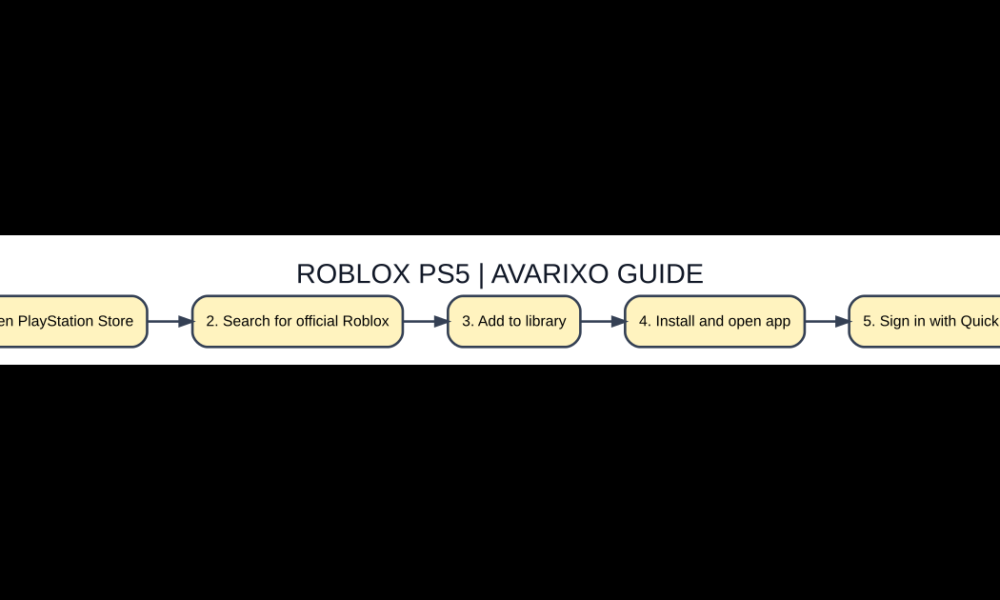
Five-step checklist
- Open PlayStation Store. Check the official platform requirements before changing settings.
- Search for official Roblox. Use the authentic download, website or account interface.
- Add to library. Confirm the edition, device, account and feature match your goal.
- Install and open app. Test with a small example and check the displayed result.
- Sign in with Quick Login. Protect important files and keep a way to revert if needed.
Install from PlayStation Store
From your PS5, open PlayStation Store and search for Roblox. Choose the official Roblox listing, select Add to Library if prompted, and follow the installation steps. Open the installed app from Game Library. Ignore websites claiming that you need to enable developer mode on your console or purchase a special PS5 Roblox activation key. Use the publisher listing and current PlayStation regional availability as the decisive sources.
How to sign into your existing Roblox account
When Roblox starts, follow the available sign-in prompts. Roblox’s official PlayStation instructions reference Quick Login: authorize the console login from a compatible phone or computer already signed in to your Roblox account. This can avoid manually typing a long password through a controller. Only approve a code shown on your own PS5, and never enter a Quick Login code sent by someone in Discord or messages.
Can PS5 users play with PC and mobile friends?
Roblox’s PlayStation FAQ says compatible experiences can be shared with Roblox users on multiple platforms. Cross-play does not mean every individual experience has full controller support or identical feature availability. Some developers design menus and controls primarily for mobile or keyboard input. Before arranging a group session, have each participant check whether the specific experience opens on their own device.
Controls, accessibility and content ratings
Roblox on PlayStation is rated T for Teen according to Roblox’s published FAQ, with platform and parental-control considerations that may affect visibility or social features. Follow the game creator’s controller instructions rather than expecting every keyboard shortcut to map directly to a DualSense button. Test basic movement, menus and camera behavior in one simple experience before attempting a difficult game.
When the game or login does not work
Check that your PS5 is online, that the app and console are updated, and that Roblox service status is not disrupted. If Quick Login fails, cancel the old code and generate a new request through the actual console. If only one experience cannot be joined, look for its device support and server status. If the Roblox store entry is absent, verify the account’s store region before attempting risky workarounds.
Quick comparison
| Option | Meaning / location | When it matters |
|---|---|---|
| PS5 | Official Roblox app in supported countries | Controller gameplay |
| PS4 | Official Roblox app in supported countries | Console gameplay |
| Desktop | Roblox Player and Studio separately | Keyboard/mouse and development tools |
| iOS/Android | Mobile Roblox app | Touch-based gameplay |
Frequently asked questions
Is Roblox free to download on PS5?
Roblox’s app is free to install in supported countries; optional in-game purchases can cost money.
Can I use my existing account on PS5?
Yes. The official guide describes signing in using Quick Login.
Can I play with Xbox or PC friends?
Cross-platform experiences are supported, subject to each specific experience’s availability and controls.
Is Roblox Studio available on PS5?
No standard PlayStation app provides the same official game-development environment as Roblox Studio on computer.
Verification and further reading
For up-to-date primary guidance, read Roblox: PlayStation FAQ. See also AVARIXO’s related guide. The details above describe ordinary, supported behavior, not modified clients or unsupported workarounds.

Other Articles

How to Check Your Chrome Version and Update Safely on Any Computer
