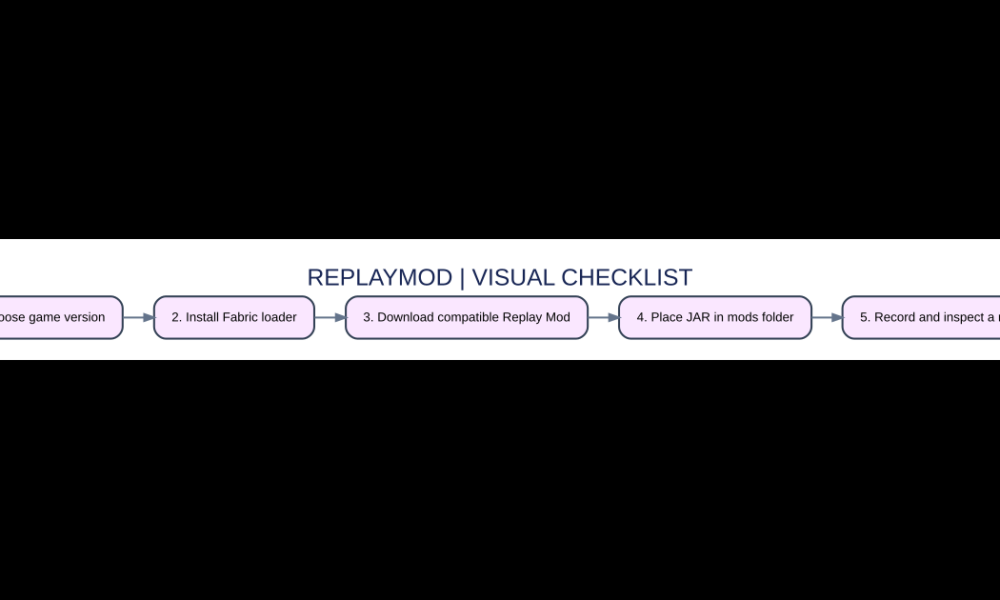

Quick answer: Replay Mod records Minecraft: Java Edition gameplay data and allows you to create cinematic replays with independent camera movement. For modern Minecraft Java versions, install the appropriate Fabric loader, download Replay Mod for exactly your game version, place its JAR in the mods folder and launch the matching profile.

Step-by-step overview
- Choose game version. Start by checking that the platform or game version matches the scenario described here.
- Install Fabric loader. Use the official program, store or documented option rather than a copied shortcut.
- Download compatible Replay Mod. Confirm that any account, installation or item requirement has been met.
- Place JAR in mods folder. Test the result before making further irreversible changes to important files or accounts.
- Record and inspect a replay. Keep your recovery route or backup so that an unexpected failure is not permanent.
Replay Mod is a recording tool, not a video recorder
Unlike a simple screen capture, Replay Mod saves gameplay state and lets you move a virtual camera around a recorded scene afterward. This enables fly-throughs, third-person time-lapses and cinematic shots that would be difficult while controlling a player normally. The mod is client-side, so you do not install it on a public Minecraft server to make your own local recording. Exporting the replay to a conventional video is a separate rendering step.
Install the correct loader and JAR
The official Replay Mod documentation states that newer releases use Fabric; older releases such as Minecraft 1.12.2 use Forge. Choose the Minecraft version first, obtain the matching loader, then use Replay Mod’s official download page to select that same version. Place the downloaded mod JAR into the correct instance’s mods directory. Launch the profile once and verify the mod menu or controls appear before opening a valuable long-term world.
Record a session without unnecessary risk
Start a short test in a throwaway creative world to understand when the mod records data and where it saves replay files. Keep enough disk space because long sessions may be sizeable. Record a few seconds of building, stop the world and open the replay viewer. This proves your installation works before you try capturing a long survival playthrough with friends. Consider other players’ privacy and your server’s recording rules.
Create a smooth cinematic camera path
In replay mode, move the free camera to a starting position, establish keyframes and preview how it transitions between them. A good short clip usually needs only a clear establishing shot and one purposeful movement. Avoid excessive camera acceleration that makes buildings hard to see. When making a time-lapse, preview the path at the final intended duration so the virtual camera does not cross through terrain as the scene progresses.
Rendering and editing the footage
After setting up a camera path, choose render settings appropriate to the intended platform. Higher resolution and smoother output require more computing power and storage; do a short proof render before attempting the full sequence. Keep your original replay file as an editable master, and export a standard video for upload. Music and commentary are normally added in the editing process, not implied by the replay capture.
Fixing crashes and missing replay menus
Version mismatch is a common culprit: a JAR built for a different Minecraft or loader release may fail to load. Review whether other rendering mods or Sodium versions are compatible with the chosen Replay Mod version. Check the game’s latest log for the named conflicting mod. Remove newly added files from a copied test instance one at a time; do not delete your only saves folder while troubleshooting.
Important differences at a glance
| Feature or edition | What it means | Best use or warning |
|---|---|---|
| Modern Java Replay Mod | Fabric plus matching JAR | Cinematic gameplay replays |
| Older Java releases | May require Forge | Legacy recordings |
| OBS or screen recorder | Desktop capture app | Ordinary on-screen footage |
| Replay exported video | Rendered output file | Sharing/editing on video platforms |
Frequently asked questions
Does Replay Mod work on Bedrock?
The official Replay Mod project covers Minecraft Java mod-loader releases, not a normal Bedrock add-on.
Do I install it on a server?
The official documentation describes the mod as client-side.
Why does Minecraft crash after adding Replay Mod?
Check exact Minecraft and loader versions, dependencies and compatibility with other rendering mods.
Can I edit the camera after recording?
Yes. Repositioning and keyframe camera movements is a central purpose of the replay viewer.
Sources and additional help
Review the Replay Mod official documentation for version-specific instructions and changes. See also our related AVARIXO article. This editorial guide explains supported mechanics and practical considerations; check your exact game or app release before following older tutorials.

Other Articles