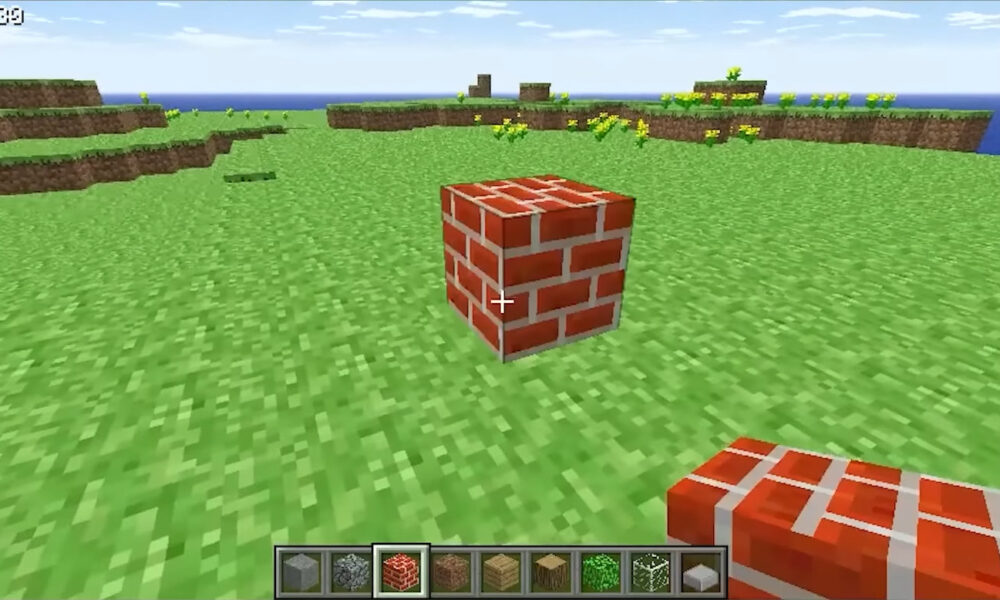

Minecraft Classic is an official, browser-based throwback to Minecraft’s early 2009 building experience. You can open it at classic.minecraft.net without hunting for a third-party installer. Its charm is also its limitation: Mojang describes a tiny selection of 32 building blocks, a deliberately old-fashioned interface and the quirks of the original game. If you expect the full modern Minecraft experience, this is a different product.
The official Minecraft anniversary announcement from May 7, 2019 explains why Classic returned: the team wanted players to experience a slice of Minecraft as it existed a decade earlier. This guide covers the legitimate route to playing, what the free version includes, why a browser might refuse to load it and how it compares with today’s Java and Bedrock editions.
Where to play Minecraft Classic for free
- Use a desktop or laptop with a physical keyboard and a current browser.
- Navigate directly to the official Minecraft Classic website. Double-check the address instead of choosing a similarly named download site.
- Wait for the page to initialize. If it loads, follow the controls and instructions displayed by the game.
- Start with a simple house, pathway or tower. The limited palette is a good excuse to experiment with shape before worrying about complex survival mechanics.
The game is provided as a browser experience rather than a standalone executable. A site offering a mysterious “Classic installer” or asking for your Minecraft password is not a necessary part of this official route. For the up-to-date PC game, use Minecraft’s official launcher download instead.
What is Minecraft Classic?
Classic is an early-style creative sandbox: select a block, place it, remove it, and shape a basic landscape. It showcases the foundation of Minecraft’s building identity long before the larger survival, progression and exploration systems many players associate with the game today.
Mojang’s 2019 announcement explicitly describes 32 blocks and intentionally retained old bugs. That is the reason the browser edition can feel startlingly minimal. It is not a streamlined version of the latest Minecraft update; it is a historical snapshot designed for nostalgia and experimentation.
What can you build with only 32 blocks?
Start with structures that reward composition rather than rare materials: a brick-and-stone fort, an archway, a simple bridge or a maze. Try building a recognizable silhouette using only a few contrasting blocks. Older textures and the compact block selection make large details harder, but they also encourage clean, readable builds.
A helpful challenge is to recreate a familiar modern build in simplified form. You will quickly see which parts depend on newer building materials and which rely purely on proportions.
Minecraft Classic versus modern Minecraft
| Question | Classic browser version | Modern Java or Bedrock |
|---|---|---|
| Purpose | Historical building sandbox | Current, fully developed Minecraft game |
| How to start | Official browser page | Supported device or launcher |
| Block selection | 32 blocks in Mojang’s Classic release | Many more materials and systems |
| Survival and progression | Not the modern survival experience | Full Survival and Creative options |
| Best for | Nostalgia, quick creative experiments | Long-term worlds, exploration and current features |
For an explanation of the modern Creative inventory and flight, read AVARIXO’s Minecraft Creative Mode guide. It covers features you should not automatically expect to find in Classic. If you are new to crafting in the current game, our crafting table walkthrough is another useful comparison.
Why Minecraft Classic may not load in your browser
The official Classic webpage can display a message that a keyboard is required or that the browser lacks WebGL or WebRTC support. Those messages come from the game site itself. They do not mean your Microsoft account has been banned, and they are not an invitation to install an unofficial copy.
1. Switch from a phone or tablet to a computer
The official browser page may reject devices without a keyboard. A current desktop or laptop browser is the sensible starting point. Attaching a keyboard to an unsupported device does not guarantee compatibility, so use the site’s guidance rather than a download workaround.
2. Check browser and graphics support
Update your browser, ensure hardware acceleration is available where supported, and try a different mainstream browser if the page still reports WebGL or WebRTC trouble. Graphics drivers, browser permissions and security policies can vary across machines. A locked-down school or work browser may prevent the game from running.
3. Avoid fake mirror sites
Because Classic is a popular search term, similar-looking websites can appear in results. Stick to the direct official address; you should not need a cracked launcher, an extension that requests broad permissions, or personal account details to access this anniversary version.
Does Minecraft Classic replace a full Minecraft purchase?
No. The official browser experience is a limited, nostalgic edition. Minecraft: Java Edition and Bedrock Edition offer current gameplay, saved worlds and platform-specific features outside Classic’s historical remit. If you already own the PC editions, Minecraft Help explains how to check ownership through the official launcher or Microsoft Store.
The distinction matters when searching for multiplayer servers, new creatures or current crafting recipes. A tutorial written for the latest Java version may ask for blocks that simply do not exist in Classic.
Minecraft Classic FAQ
Is Minecraft Classic official?
Yes. Mojang announced the browser release as part of Minecraft’s tenth-anniversary celebrations in 2019. The legitimate site uses the classic.minecraft.net address.
Is Minecraft Classic free?
The anniversary browser version was released for free. Do not confuse it with a free download of current Java or Bedrock editions, which are separate products.
Can I play Minecraft Classic on my phone?
The official webpage may display a keyboard-required warning on mobile devices. A keyboard-equipped computer is the more reliable choice.
Why does the game look so different?
It deliberately reflects the early block palette, visuals and limitations of Minecraft’s 2009 era. Those differences are the point of Classic, not a graphics bug that needs a texture pack.
How many blocks are in Minecraft Classic?
Mojang described 32 building blocks in its official 2019 anniversary announcement. That figure refers to this Classic browser experience, not the total number of blocks in modern Minecraft.
The takeaway: Minecraft Classic is worth opening when you want a quick look at the game’s roots. Use the official browser site, keep expectations focused on early building mechanics, and choose the current editions when you need modern survival, content updates or long-term play.

Other Articles

What Is a Break Point in Tennis? 30–40, Deuce & Conversion
Minecraft Mobs Guide: Passive, Neutral & Hostile Creatures
