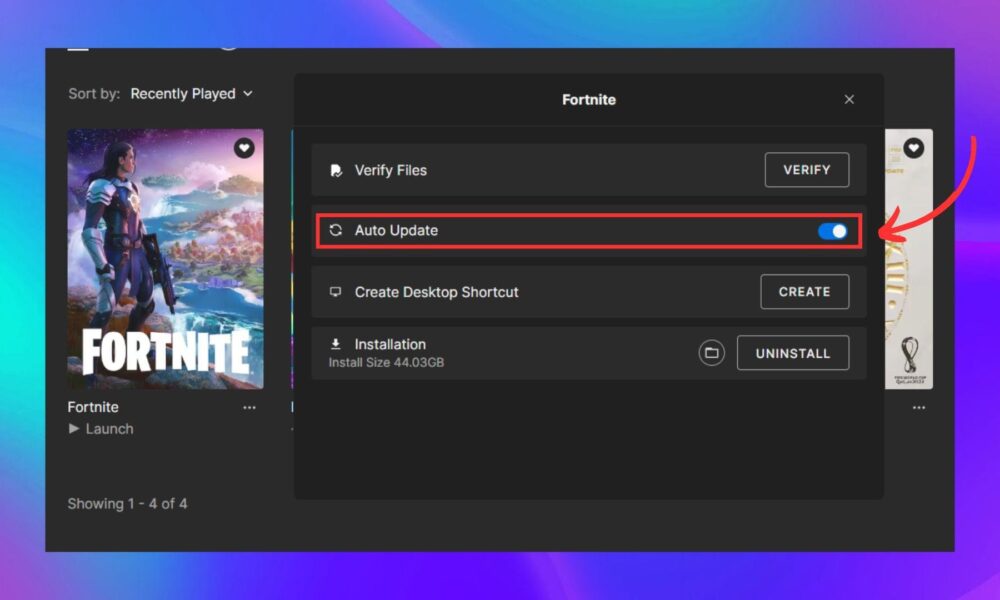

Reviewed October 9, 2026. Fortnite updates can arrive on multiple platforms at different times, and a missing Update button is not always an error. Sometimes the console or launcher has already queued the download; sometimes a restart is needed; sometimes Epic is performing service maintenance. Use the platform-specific steps below rather than reinstalling first.
Check the update status before changing files
Close any running game session, reconnect to a stable network and check the Epic Games status page for active service issues. An in-game message asking for a newer build may mean the update has not finished downloading. A matchmaking problem during maintenance can resemble an outdated-client problem, so read the exact message before treating the installation as corrupt.
Update on PC with Epic Games Launcher
Epic’s support instructions say to open Epic Games Launcher and launch Fortnite; if an update is available, it starts automatically. You can also inspect the Library and download activity for a queued patch. Let the installation complete and avoid turning off the PC mid-update. If the process reports damaged files, use the launcher’s separate Verify feature instead of deleting the game immediately.
Update on PlayStation and Xbox
On PlayStation, open the game in Library, press the controller’s Options button and choose Check for Update. On Xbox, open My Games & Apps, go to the game’s available updates and install the offered Fortnite patch. Exact dashboard labels can differ by console generation and software version. Confirm the free space needed before trying the same download repeatedly.
Update on Nintendo Switch or mobile
On Nintendo Switch, highlight Fortnite from the Home menu, press + or -, select Software Update and then Via the Internet. On devices using the Epic Games Launcher mobile app, Epic documents opening Fortnite in the launcher and pressing Update. Other app-store installations follow that store’s own update interface. Avoid unofficial APK or patch downloads advertised through comments or pop-ups.
If Fortnite still says an update is required
Restart the console or launcher, check whether the update finished and whether online services are available. On PC, verify the install if there is a repeated corruption error. When everything appears current but the error persists, write down the platform, version displayed and exact error text before contacting official support. Avoid guides that promise secret update files or ask for Epic login credentials.
Frequently asked questions
Does Fortnite update itself automatically?
Many installations can queue updates automatically, but the process depends on launcher, platform and device settings.
Should I delete Fortnite to force an update?
Usually not. Check the platform update controls and service status first; reinstalling is a later troubleshooting step.
Can I update Fortnite during downtime?
A patch may download while gameplay services are down, but an updated client cannot guarantee servers are available.
Sources and related guides
Official reference material: source 1; source 2.
Explore Fortnite support guides and Fortnitemares 2026 guide on AVARIXO.

Other Articles
Spotify Offline Mode: How Downloads Work on Mobile and Desktop
How to Verify Fortnite Game Files in Epic Games Launcher (PC)
