
Reviewed October 9, 2026. An update that stops installing, a crash after loading, or a missing game file does not always mean Fortnite must be downloaded again from scratch. Epic Games Launcher has a built-in file-verification process intended to compare local game files with the version the launcher expects.
What verification checks and what it does not
Epic says verification checks whether installed files are damaged or different and repairs or replaces mismatched files. The process is not the same as deleting a game or resetting your Epic account. It does not repair an ISP outage, server downtime, an unsupported PC or every graphics-driver problem. Keep those causes separate or you may spend hours rechecking files that are already correct.
Verify Fortnite on a Windows PC
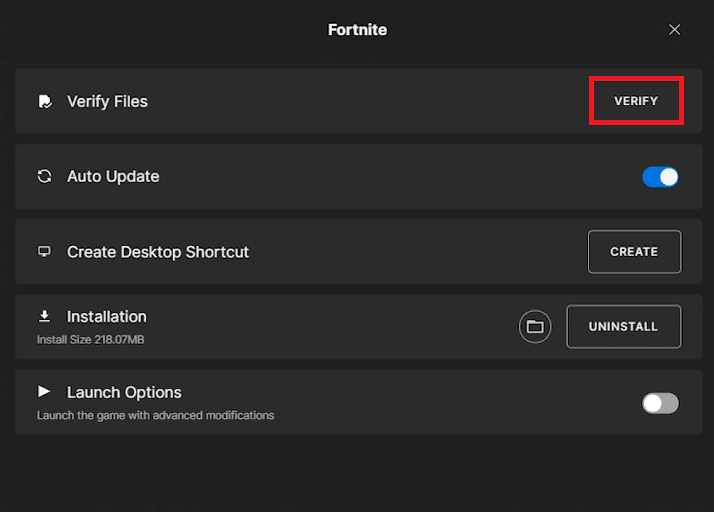
Close Fortnite before starting. Open Epic Games Launcher and go to Library. Locate Fortnite, open its three-dot options menu, choose Manage, then press Verify. Leave the launcher open while validation runs; the time required varies with disk speed, game size and whether files need replacing. If the launcher downloads replacement data, allow it to finish before you reopen the game.
If the verify button is missing or verification fails
Confirm you are using Epic Games Launcher rather than trying to use a console’s game-management menu. Check whether Fortnite is actually installed under the current launcher library and whether the launcher has an update pending. Restart the launcher after a normal exit. Review available disk space before retrying; a full drive can prevent repairs from completing. Avoid editing installation folders manually unless official support instructs you to.
What to try when the game still crashes
Epic’s broader PC crash checklist recommends checking the PC’s minimum requirements, launcher cache, current display drivers and conflicting background software. A single symptom such as black screen or a graphics error can require its own diagnostic path. Save the exact error code and note whether the issue appeared after a specific update; that evidence will help when opening an Epic Support ticket.
Console players need a different method
The three-dot Manage > Verify path is for the Epic Games Launcher on PC. On PlayStation, Xbox and Nintendo Switch, use the console’s own update and software-management menus instead. Avoid following PC registry or folder-deletion advice on console hardware. Game progress tied to an Epic account should not be treated as a license to delete local data without checking its sync status.
Frequently asked questions
Does Verify delete my Fortnite account progress?
Epic says verification itself does not affect your saved data; still avoid unrelated manual data deletion.
How long does checking files take?
There is no universal duration. It depends on the installation, drive performance and repairs required.
Does verification fix a server outage?
No. Check Epic’s status page separately before treating a connection error as a damaged local file.
Official sources and further reading
Check the provider’s current help information before changing account or save settings: official guide 1; official guide 2.
Related AVARIXO reading: Fortnite connection troubleshooting | Epic account linking guidance.

Other Articles

