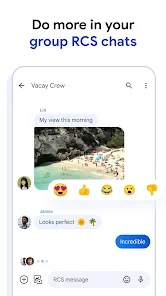

Google Messages is Google’s messaging app for Android, with support for SMS, MMS and Rich Communication Services (RCS). RCS adds features such as typing indicators, read receipts, higher-quality media and messaging over Wi-Fi or mobile data when supported.
What RCS changes
- Send higher-resolution photos and videos.
- See typing indicators in supported conversations.
- Use read receipts when both sides allow them.
- Send messages over Wi-Fi or mobile data.
- Use richer group-chat features.
RCS availability depends on the device, carrier and messaging provider. Google notes that RCS now works between Android and supported iPhone devices when RCS is enabled.
Turn on RCS chats
Open Google Messages, tap your profile picture, open Messages settings, then look for RCS chats. If the option is available, follow the prompts to verify your phone number and activate the service.
RCS, SMS and MMS
If RCS is unavailable for a conversation, Messages may fall back to SMS or MMS depending on your settings and carrier support. SMS and MMS do not offer all RCS features, so a conversation can behave differently depending on the recipient.
Privacy and encryption
Google Messages can provide end-to-end encryption for supported RCS conversations between Google Messages users. The exact security behavior depends on the conversation and provider, so check the message details when security is important.
Fix RCS stuck on connecting
- Confirm mobile data or Wi-Fi is working.
- Make sure Google Messages is updated.
- Check that the phone number and SIM are active.
- Avoid repeatedly turning RCS off and on unless troubleshooting requires it.
- If you recently changed phones or messaging apps, verify that the old device is no longer holding the RCS registration.
Missing SMS or MMS messages
Check the default SMS app, carrier service and signal. If only one contact is affected, confirm the number is correct and not blocked. For media messages, carrier MMS settings can still matter when RCS is not being used.
Bottom line
Use RCS when available for the richer experience, but remember that SMS and MMS still act as fallback technologies in many situations. Keep Google Messages updated and review RCS status after changing phones, SIMs or carriers.

Other Articles
Android Auto: Setup, Supported Cars and Connection Fixes
New iPad Setup: Apple Account, Wi-Fi and First Settings
