
Quick answer: GoFullPage is a Chrome extension designed to capture a long webpage as a full-page screenshot. After installing the genuine extension from the Chrome Web Store, open the target page and click its toolbar icon. It automatically scrolls and assembles a capture that you can inspect, download and share, subject to site and browser restrictions.
Quick setup checklist
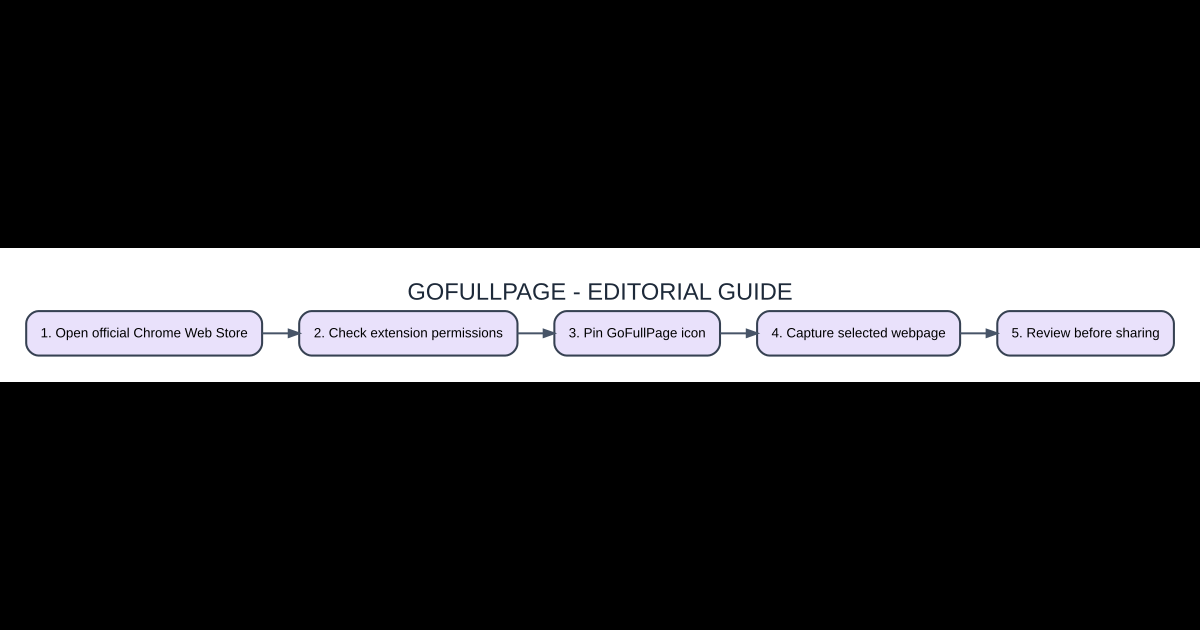
- Open official Chrome Web Store: Identify the version or account requirements and avoid skipping verification.
- Check extension permissions: Follow only the actual program, game or service instructions for this step.
- Pin GoFullPage icon: Confirm that the correct settings or content are selected before proceeding.
- Capture selected webpage: Test the result in a reversible way before investing more work.
- Review before sharing: Save a backup or a safe way to recover from an unexpected error.
What a full-page screenshot captures
A normal keyboard screenshot often includes only the visible screen area. A full-page capture attempts to include a tall webpage beyond the viewport, which can be useful for documenting a design, bug report, article layout or long invoice. GoFullPage performs this by navigating through webpage content and assembling the result. It is not the same as exporting a page’s editable HTML, source files or selectable PDF text.
Install from the trusted store listing
Open the Chrome Web Store and search for the verified GoFullPage extension listing. Inspect the developer, permissions, update history and recent reviews before selecting Add to Chrome. Browser extensions may have broad access to the pages they operate on; do not install a lookalike extension based only on the icon. After installation, use Chrome’s Extensions menu to pin the tool so it is available on the toolbar.
Capture a long article or report
Navigate to the precise page you need, allow essential content to load and click the GoFullPage toolbar button. The extension scrolls through the document and processes a final composite image. Wait for it to complete before switching tabs. Inspect the result at full zoom for repeated navigation bars, incomplete lazy-loaded photos, truncated dialogs or other page components that did not behave correctly during automated scrolling.
Saving PNG versus PDF
An image file preserves what the capture looks like and is convenient for annotation and sharing in project chats. A PDF can be easier to organize as a print-like document, depending on what options the extension currently supports. Neither format automatically guarantees that a dynamically loaded or infinite-scroll page is fully captured. Choose an export after checking image sharpness and the presence of any private information.
Why sticky headers repeat in screenshots
A fixed navigation bar stays on screen while the page scrolls. Some capture methods may accidentally reproduce it multiple times in the stitched output. Lazy-loading elements, canvas graphics, advertisements and motion effects can also create seams. Try reducing animation, waiting for assets to finish loading, or capturing shorter portions. If the page belongs to you, adjusting sticky element behavior for capture can improve consistency.
Permissions, privacy and browser limitations
Treat screenshots of account dashboards, private messages and internal documents as sensitive files. Review the full captured image before sending it to collaborators, since content below the fold may reveal details you did not intend to share. Chrome restricts extension access on some special or internal browser pages. If a capture is blocked, try the browser’s own screenshot or print options rather than disabling security controls.
Side-by-side comparison
| Option | What it means | Why it matters |
|---|---|---|
| Visible screenshot | Only current screen | Quick single-view proof |
| GoFullPage image | Combined scrolling page | Visual QA and bug reports |
| Browser Print to PDF | Print-style document output | Documents better suited to printing |
Frequently asked questions
Does GoFullPage capture content below the screen?
Yes. Its core purpose is capturing scrolling webpages as a composite image.
Why is the header repeated?
Fixed or sticky elements can be rendered repeatedly during stitching.
Does it work on Chrome internal settings?
Extensions face access restrictions on some browser-internal pages.
Should I share an unreviewed screenshot?
No. Check for private data or unexpected content first.
Official source and related coverage
For further verification and version changes, see GoFullPage: Chrome Web Store listing. Our related AVARIXO coverage provides additional context. Review current interfaces and eligibility rules before performing account or software changes.

Other Articles

Minecraft Creative Mode: How to Fly, Build and Switch from Survival
Spotify Can’t Play This Right Now? Fix Playback on Desktop and Phone