
Quick answer: COUNTIF counts cells matching one condition in a selected range.
Start with the right setup
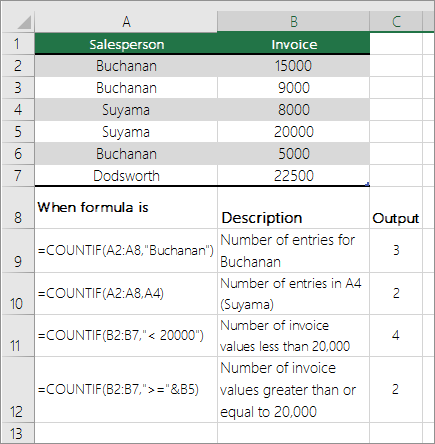
Use =COUNTIF(A2:A100,”Done”) to count a text label, or =COUNTIF(B2:B100,”>=10″) for a numeric threshold.
Build the core result
Wildcards can match patterns: an asterisk represents multiple characters and a question mark represents one character. Escape them when searching for literal symbols.
Choose a reliable output
For duplicate detection, compare COUNTIF against the occurrence count of a specific value, but decide how blank cells should be treated.
Check quality and avoid mistakes
Use COUNTIFS for multiple conditions and check that the source data does not contain invisible spaces or mixed text/number formats.
Practical checklist
- Confirm that the tool, version and settings match your intended result.
- Review your source information before editing or exporting.
- Test the finished output on the device or application where it will be used.
- Keep a backup of important work and protect private account information.
Frequently asked questions
Can I use the same steps on every device?
Not always. Menu labels, supported file types and feature availability may differ by device, account plan and software version. Check the current official help center when an option is missing.
What if the result looks wrong?
Check the source data or design, confirm your selected format and test a simple example. Change one setting at a time to identify the cause rather than starting over immediately.
Official documentation
For updated instructions, see official help documentation.

Other Articles
SUMIF in Excel: Examples, Criteria and Common Mistakes
CONCATENATE in Excel: Join Names, Text and Cell Values