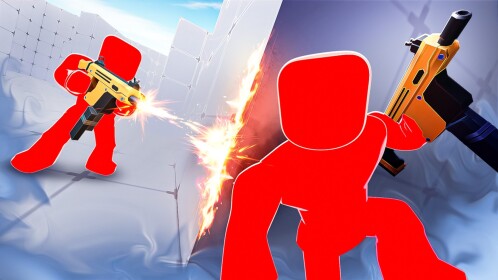

Roblox RIVALS is a competitive first-person shooter experience by Nosniy Games. Its official Roblox page describes duels ranging from 1v1 to 5v5, with the first side to win five rounds taking the match. To start, open the verified RIVALS experience on Roblox, enter the game, approach a duel pad, and follow the on-screen prompts to queue. You can earn keys to unlock weapons and skins, and complete contracts for rewards. The exact shop contents and available modes can change with updates.
This guide focuses on the basic game loop and decisions that help a new player improve. It does not promise free keys, provide unverified redeem codes or claim that one weapon is universally best.
What is Roblox RIVALS?
RIVALS is built around short, repeatable FPS duels. Unlike a large open-world Roblox experience, each match gives you an immediate objective: defeat the opposing side often enough to reach five round wins. Because rounds reset, losing one encounter is not the end of a match. You can use the next round to change your positioning, pace and loadout choices.
| Question | Answer |
|---|---|
| Who makes RIVALS? | Nosniy Games, according to the official Roblox experience page |
| How many players per side? | Officially described as duels from 1v1 through 5v5 |
| How do you win? | Be the first side to five round wins |
| How do you enter a duel? | Use a duel pad in the experience |
| What can keys unlock? | Weapons and skins, subject to the current in-game selection |
| Are there contracts? | Yes; the official description lists contracts and rewards |
| What devices are listed? | Desktop, phones, tablets, Xbox and PlayStation 5 |
How to play RIVALS for the first time
- Open the correct game. Use the official Roblox experience link rather than assuming that any similarly named game is the original. Check that its creator is Nosniy Games.
- Load into the experience. Wait for the interface and map to finish loading before adjusting controls.
- Find a duel pad. The official description specifically tells players to step on a duel pad to challenge someone.
- Read the match format. Know whether you are in a solo duel or a team match; positioning that works in 1v1 can be risky in 5v5.
- Play for five round wins. Concentrate on staying alive, controlling sightlines and learning from each round rather than chasing every opponent.
- Review rewards after playing. Check the current key, contract and unlock interfaces inside the game. Their contents may change, so treat screenshots from old guides as historical.
1v1 versus 5v5: what changes?
In a 1v1, every move reveals information about a single opponent. You can pay attention to where they peek, how quickly they reappear after a shot, and whether they tend to rush or wait. Your own mistakes are easier to diagnose because there are fewer simultaneous threats.
In a 5v5, staying near teammates and avoiding isolated pushes matters more. You do not need to follow every teammate into a narrow lane: covering a different angle can be more valuable than adding another player to the same sightline. When teammates are fighting, avoid blocking their movement or exposing the entire group to one route.
Neither mode automatically makes you a better player. Use 1v1 to practice fundamentals and team modes to practice awareness, communication and timing.
Beginner loadout priorities: start with a purpose
RIVALS features unlockable weapons and skins, but specific availability, balancing and prices may change. Rather than buying a weapon because a video labels it “overpowered,” ask what problem it solves. Do you miss shots at medium range? Are you getting caught while reloading? Do you need to learn close-range tracking?
| Problem you notice | Practice goal | What to avoid |
|---|---|---|
| Shots miss moving targets | Track smoothly and keep the crosshair near expected movement paths | Changing sensitivity after every lost round |
| You lose while reloading | Reload behind cover or create space before committing | Reloading in the open |
| You get surprised from the side | Check one additional angle before crossing open ground | Assuming every opponent is directly ahead |
| You lose close duels | Practice controlled movement while maintaining aim | Moving so unpredictably that you cannot aim yourself |
| You unlock too many items | Learn one familiar setup before making the next purchase | Assuming cosmetic skins guarantee better performance |
Five habits that make RIVALS easier to learn
1. Keep your crosshair at the next likely threat
Players often look at the floor while moving, then have to correct vertically and horizontally when someone appears. Keep the crosshair near the height and doorway where you expect an opponent. That reduces the distance your aim must travel.
2. Use cover as a checkpoint
Move from one protected position to another instead of sprinting through the center of an open lane. Before leaving cover, identify where the next safe position is. This makes your decisions deliberate even when you are new to the map.
3. Do not repeat the same losing peek
If an opponent holds the same angle and wins twice, changing your timing, route or approach is more useful than charging the identical doorway again. Review one mistake between rounds and correct it in the next attempt.
4. Build consistent control settings
Mouse, touch and controller users experience different control challenges. Start with a comfortable sensitivity and test it for several matches. Change one setting at a time so you can tell what actually helped. Do not copy an influencer’s exact sensitivity and assume it will suit your device.
5. Learn the objective before chasing rewards
Keys, contracts and cosmetics give you goals beyond winning, but a contract can distract you from learning the match. Spend your first sessions understanding duel pads, rounds, sightlines and your default equipment; then work toward unlocks you genuinely want.
How do keys and contracts work?
The game’s official Roblox listing says players can earn keys to unlock new weapons and skins and complete contracts to unlock rewards. It does not guarantee a fixed key amount for every activity in the public description. For current earning rates, requirements and inventory, read the in-game UI. A reward video posted months ago may describe an older economy or a limited event that has ended.
Before spending a key, compare the unlock with your actual play style. If you are still learning positioning, you may benefit more from mastering an existing weapon than immediately switching to unfamiliar equipment. Never buy keys or account access from unofficial sellers.
RIVALS codes: how to avoid fake claims
The official experience description has referenced limited-time reward codes, but it does not establish that a specific code is active today. We therefore do not list unverified strings as working codes. If the game offers a redeem field, follow the instructions shown inside the official experience and check announcements from its actual creator. Be suspicious of sites demanding a Roblox password, a browser extension or a survey before revealing a “secret code.”
RIVALS not loading or running poorly?
First confirm that Roblox itself is up to date and that your internet connection is stable. If a specific experience will not load, retry from its official Roblox page and check whether other experiences work. If the entire client is outdated, follow our Roblox update guide. If the client behaves strangely after an update, our Roblox cache troubleshooting guide explains device-specific options. Clearing cache is not a substitute for an account or moderation appeal.
Can you practice with friends?
Practicing with a friend can make it easier to focus on one skill at a time: movement, aiming or reading angles. Whether a particular private lobby or server feature is available for RIVALS depends on the game’s current settings. Do not assume all Roblox experiences support the same private-server options. For the general platform rules, see how Roblox private servers work.
Frequently asked questions
Is RIVALS on Roblox free to enter?
Use the official Roblox experience page to check current access and any optional purchases. Avoid third-party downloads advertising a separate RIVALS installer.
Who is the real RIVALS developer?
The official experience at the link above lists Nosniy Games as the creator. Similar names alone do not establish authenticity.
How many rounds do you need to win?
According to the official game description, the first side to five wins takes the duel.
Can you play RIVALS on mobile or console?
The game’s official listing includes desktop, phones, tablets, Xbox and PlayStation 5. Individual control layouts and performance vary.
Are free RIVALS key generators real?
Do not trust third-party key generators or pages asking for your password. Use only rewards and redemption methods offered by the legitimate game.
Source and image note: Gameplay facts above come from the official RIVALS listing. The featured photograph is a general Roblox gameplay illustration, not a screenshot of RIVALS, by Ferarchick new, CC0 1.0 via Wikimedia Commons. RIVALS and Roblox are trademarks of their respective owners.

Other Articles
How to Make Roblox Games in 2026: Build Your First Playable Obby
Minecraft Build Ideas: 20 Survival Projects You Can Actually Finish