
Quick answer: No Man’s Sky is playable on Nintendo Switch, with a separately enhanced experience for Switch 2. The core loop is exploring generated planets, restoring your starship, managing hazards, collecting resources and gradually upgrading equipment. Check your exact eShop version before relying on multiplayer or performance features demonstrated on another platform.
At a glance
| Topic | Essential point |
|---|---|
| What No Man’s Sky offers on Switch | No Man’s Sky is an open-ended science-fiction exploration game from Hello Games. Its galaxy contains procedurally generated star system |
| Switch versus Switch 2 versions | Nintendo now lists different space requirements and capabilities for Switch-family hardware. A Switch 2 edition is enhanced for newer h |
| The first objective: repair your equipment | A typical starting journey places you on a planet where environmental hazards demand attention. Follow the in-game tutorial to locate e |
| Hazard protection and life support are different systems | Life support keeps your traveler alive during normal activities, while hazard protection helps withstand extreme temperatures, toxicity |
| Use the scanner and analysis visor to plan routes | Your multitool’s scanner and Analysis Visor help locate minerals, plants, creatures, buildings and points of interest. They can also pr |
What No Man’s Sky offers on Switch
No Man’s Sky is an open-ended science-fiction exploration game from Hello Games. Its galaxy contains procedurally generated star systems, planets, creatures and resources, and players decide whether to prioritize survival, discovery, trading, building or combat. The Switch version launched in October 2022, expanding the game’s reach beyond PC and other consoles. Nintendo’s store describes planets that can be reached by flying from space to the surface, with exploration and danger woven into the same progression. The scale of the universe should not be confused with an online world where every activity necessarily requires another player.
Switch versus Switch 2 versions
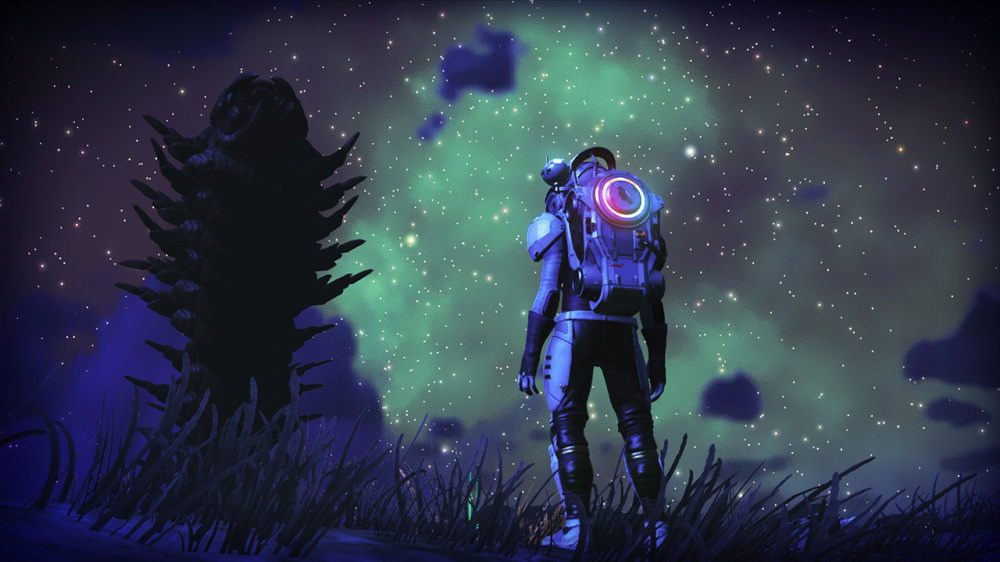
Nintendo now lists different space requirements and capabilities for Switch-family hardware. A Switch 2 edition is enhanced for newer hardware, while the original Switch edition has its own performance limitations. Do not assume an image recorded on a powerful PC represents original Switch graphics or frame rate. Likewise, hardware-specific rendering and multiplayer changes cannot automatically be applied to older models. Check the current version listed under your Nintendo account, the installed update and the official Hello Games patch notes before buying a console based on a particular feature.
The first objective: repair your equipment
A typical starting journey places you on a planet where environmental hazards demand attention. Follow the in-game tutorial to locate essential materials and repair your suit systems and spacecraft. Scan nearby resources when instructed and avoid sprinting far away from your crashed ship before you understand how to recharge life support and hazard protection. If the environment is hostile, look for shelter, a cave or another safe way to regain control. Beginners who focus on collecting every exotic-looking mineral before finishing the tutorial may unnecessarily exhaust survival supplies.
Hazard protection and life support are different systems
Life support keeps your traveler alive during normal activities, while hazard protection helps withstand extreme temperatures, toxicity or radiation. They can drain under different conditions and use different recharging materials according to the current game interface. Keep an emergency reserve of materials that can restore the relevant system. Before a long mining trip, check the planet’s hazard level and your inventory rather than trusting the gauge to last indefinitely. Environmental stress is part of exploration, and learning to read warning indicators will save more time than memorizing a single perfect starter planet.
Use the scanner and analysis visor to plan routes
Your multitool’s scanner and Analysis Visor help locate minerals, plants, creatures, buildings and points of interest. They can also provide useful information about potential materials. Scan first and travel second when the planet is dangerous or unfamiliar. If an objective marker appears beyond a steep ridge, consider whether your terrain, exosuit and resources can support the journey. A more direct line on the compass is not necessarily safer than a gradual path with shelter. Documenting discoveries also creates a sense of progress even if you do not advance the main story during every play session.
Build a small first base instead of an enormous project
After the initial repair phase, the game gradually introduces building and resource systems. Start with a modest shelter and the minimum power, storage and crafting facilities supported at that point in your progression. A small organized base is easier to return to and upgrade than a huge structure that consumes all your materials. Place objects so you can move among them without searching for every station. You can build more ambitious settlements later, when travel options, materials and your understanding of electrical or logistics systems have expanded.
How to manage inventory and cargo
Different items compete for limited storage in your exosuit, ship and other later facilities. Carry the most frequently used survival and repair resources while offloading rare crafting components that you do not need immediately. Think in terms of a field kit rather than collecting every item on every planet. If you need currency, compare the sale value and future usefulness of materials before selling. A rare resource can be more valuable for equipment progression than for a quick stack of units. Inventory management is a continuing strategic skill throughout the game, not simply a nuisance of the first few hours.
Choose upgrades for the problems you actually face
Exosuit improvements, stronger multitool functions, ship upgrades and later travel capabilities all compete for attention. Identify the largest constraint first: running out of hazard protection, having too little storage or struggling in space combat. Then invest in an upgrade that reduces that specific problem. Replacing the starting ship immediately may not be as urgent as learning how to maintain and refuel it. The best upgrade route varies with your goals. A trader and a combat-focused explorer will eventually want different tools.
Multiplayer expectations need a platform check
No Man’s Sky has extensive multiplayer and community features on several platforms, but availability and functionality can differ by Nintendo Switch hardware and game version. The Nintendo eShop listing for the original Switch version describes one player in the platform information. Do not rely on a PC cross-play video as proof that an original Switch can join the same shared session. Switch 2 functionality may also differ and evolve through updates. If playing with a specific friend is your primary purchase reason, verify the exact pair of systems, editions and current Hello Games release notes first.
Saves, updates and cloud backup
Save mechanisms can change with updates and between platforms. Use the game’s supported save methods and Nintendo account features rather than transferring unknown third-party save files. Nintendo’s product notices indicate that Save Data Cloud uses paid Nintendo Switch Online when eligible, but that is not necessarily the only way the game records local progress. Before moving between consoles, check Nintendo’s official system-transfer and cloud eligibility documentation. For a useful comparison of multiplayer accounts and worlds across platforms, see our Minecraft cross-play guide.
What to do after leaving your first planet
Once you can travel safely, follow the guided missions far enough to learn the basics of hyperdrive travel, trading, base improvements and station services. Then choose one personal goal: chart several nearby worlds, establish a well-organized home base or experiment with gathering valuable resources. Take notes about resource-rich systems and keep basic survival supplies accessible. An open-ended galaxy can feel overwhelming when you try to do everything at once. Choosing one achievable target makes progression feel clearer, and you can change direction when a discovery interests you.
Official information and buying safely
The Nintendo eShop listing provides platform and technical notices, while Hello Games’ official website documents updates and new features. Prices, storage needs and performance claims change over time, so check the live store before purchasing. Avoid unofficial executables that claim to add missing Switch network functionality or unlimited resources. For general online membership requirements, consult our Switch Online guide.
Frequently asked questions
Is No Man’s Sky available on the original Switch?
Yes. The game first released for Nintendo Switch in October 2022.
Does it require online multiplayer to play?
The core exploration and survival journey supports solo play. Verify particular online features for your console and game version.
Do original Switch and Switch 2 look identical?
No. Hardware-specific enhancements and performance may differ.
What should beginners collect first?
Prioritize the resources the opening repair and survival tutorials identify, then build a small reserve for life support and hazard protection.
Can I move saved progress to another console?
Use the supported game and Nintendo account transfer methods; confirm eligibility before deleting the original save.