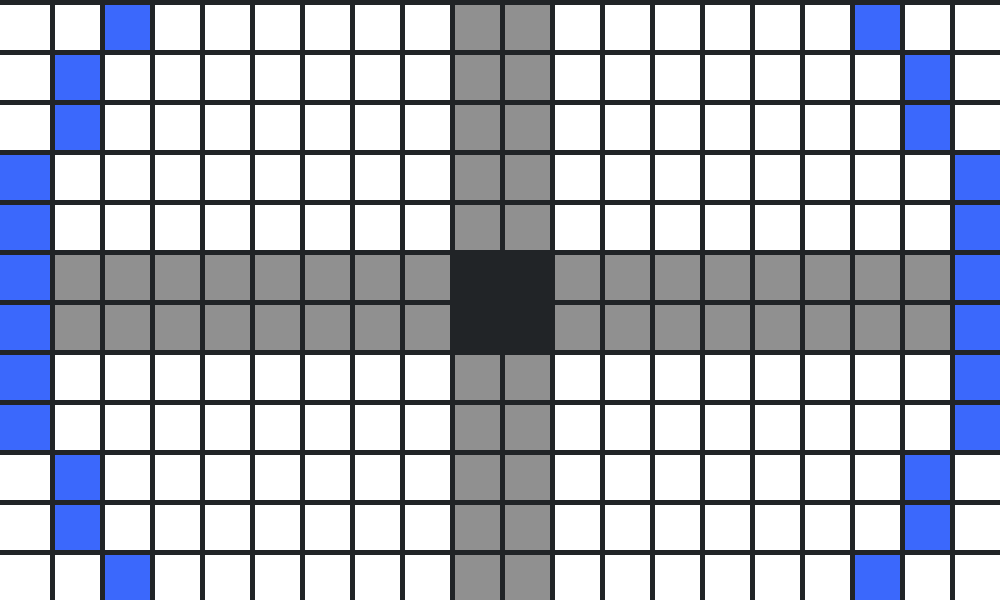

A Minecraft circle generator helps you turn a smooth circle into a block-by-block pattern. Because Minecraft blocks form a square grid, even a well-built circle has stepped edges. A pixel-circle template tells you exactly how many blocks to place on each row so the finished outline looks round from above.
Quick method: Decide the diameter of your circle in blocks, open a pixel-circle generator, enter the diameter, and follow the grid one row at a time. If you do not want to use an external tool, you can also build a symmetrical outline by planning one quarter of the circle and mirroring it.
How to use a Minecraft circle generator
- Choose the circle’s diameter, which is the total width across its center. For example, a 21-block diameter spans 21 blocks from one edge to the other.
- Open a reputable pixel-circle planning tool, such as Donat Studios’ Pixel Circle Generator.
- Enter the desired width and height. Use the same number for both to create a circle rather than an ellipse.
- Read the resulting grid: each filled cell represents one block to place in Minecraft.
- Mark the circle’s center or its bounding square in your world before placing the outline.
- Build one row at a time, checking that the left and right sides mirror each other.
- Inspect the shape from above or from a nearby elevated platform, then fill the interior if you want a solid floor.
Important: AVARIXO does not currently provide an interactive circle-generator widget on this page. The linked planning tool is a separate website. This article teaches you how to read and use a circle template accurately.
What circle size should you build?
| Diameter | Radius | Good starting project | Build difficulty |
|---|---|---|---|
| 7 blocks | 3 blocks | Small fountain or decorative platform | Easy |
| 11 blocks | 5 blocks | Compact garden or gazebo floor | Easy |
| 15 blocks | 7 blocks | Watchtower or round room | Moderate |
| 21 blocks | 10 blocks | Large tower base or arena center | Moderate |
| 31 blocks | 15 blocks | Courtyard, plaza or observatory | More planning |
| 51 blocks | 25 blocks | Large dome foundation or stadium | Advanced |
The radius values above assume an odd-numbered diameter and a single central block. For an even-numbered diameter, the geometric center lies between four blocks, so the construction plan is different. Neither approach is inherently better: choose a size that fits your building.
How to make a Minecraft circle without a generator
Step 1: Choose an odd diameter
Odd diameters such as 11, 15 or 21 blocks are convenient for beginners because they have one central block. Place a temporary marker at the intended center and count an equal distance in four directions.
Step 2: Mark the north, south, east and west edges
For a 15-block diameter, the radius is seven blocks from the center. Count seven blocks north, south, east and west to mark the four farthest points. These marks are your reference points, not a complete outline.
Step 3: Plan one quarter of the curve
Work from the northern edge toward the eastern edge using short horizontal and vertical segments. A convincing pixel circle usually combines short straight runs near the diagonal with longer runs near the cardinal edges. Avoid inventing a sequence of block counts and treating it as mathematically exact: use a verified template when precision matters.
Step 4: Mirror the pattern
Once one quarter looks correct, copy the same block-step pattern to the other three quarters. Symmetry is the main reason a Minecraft circle looks balanced. If one quadrant has a different number of steps, the shape will appear lopsided.
Step 5: Remove temporary markers
Inspect the finished outline from above. Remove scaffolding and temporary center markers, or leave the center marker if it will help with a future tower, dome or decorative design.
Odd vs. even Minecraft circles
An odd-diameter circle has a single center block. A even-diameter circle has its center between blocks, usually at the intersection of a 2-by-2 central area. This difference affects where your symmetry axes run and how you measure the width.
If your build must align with a single doorway, beacon or center pillar, an odd diameter may be easier. If you are matching an existing rectangular layout with an even width, an even diameter may fit more naturally. Decide before laying the foundation to avoid rebuilding half the curve.
How to build a filled circle
A circle generator usually displays an outline, but a solid platform is straightforward once the boundary is finished. Fill every row between the left and right edge blocks. For a two-tone floor, use one material for the border and another for the interior.
For large circles, count the number of blocks in each row before collecting materials. A rough area estimate is π × radius², but a Minecraft pixel circle does not match a mathematically perfect circle exactly, so the estimate is not a precise material count. Use the generator’s filled-grid count, if available, for accurate planning.
How to turn a circle into a dome or tower
To create a cylindrical tower, repeat the same circular outline at multiple heights and connect matching points vertically. For a dome, use circles of progressively smaller diameters as you build upward. For example, you might start with a broad base ring, then use several narrower rings as the roof rises.
A dome needs a vertical profile as well as a top-down circle plan. Simply stacking identical rings makes a cylinder, not a dome. Sketch the side silhouette first, then choose the diameter of each horizontal ring.
Common mistakes when building circles in Minecraft
Mixing up radius and diameter
If a generator asks for diameter, entering your intended radius will produce a circle about half as wide as planned. Measure the full width from edge to edge, including the boundary blocks.
Forgetting the center position
Odd and even diameters center differently. Mark the center before placing blocks so the circle lines up with your structure.
Using an unbalanced step pattern
One extra block on one side is enough to make a small circle look crooked. Build a quadrant, then mirror it rather than improvising each side independently.
Ignoring nearby terrain
A mathematically symmetric outline can still look uneven when part of it is hidden behind hills or walls. Clear the area or build a temporary platform before checking the finished shape.
Frequently asked questions
What is the best Minecraft circle generator?
A useful generator shows a clear pixel grid, accepts custom dimensions and makes it easy to count blocks. Donat Studios provides a long-standing pixel-circle generator that can be used for Minecraft planning. Compare its output with your build requirements.
Can you make a perfect circle in Minecraft?
Not with ordinary full cube blocks in the mathematical sense. You can make a highly symmetrical pixel approximation that looks round at typical viewing distances.
How do I make a 21-block circle?
Set the diameter to 21 in a pixel-circle generator, mark the central block and follow the grid. The radius from the central block to the farthest edge is 10 blocks.
Can I build an oval instead?
Yes. A pixel-ellipse generator uses different width and height values. For example, a 21-by-13 outline will be wider than it is tall.
Do Minecraft Java and Bedrock use different circle shapes?
No. Standard blocks use the same square grid geometry in both editions. The same pixel-circle pattern can be built in either game, though building controls and tools may differ.
Related Minecraft building guides
For project inspiration, read AVARIXO’s Minecraft build ideas and starter house tutorial. A circular foundation works especially well for towers, gardens and observatories.
References
- Donat Studios — Pixel Circle Generator (external pixel template tool).
- Minecraft — official game site (game context).
Editorial note: This article is an explanatory guide, not an embedded calculator. Before publication, verify that the external generator remains available and that all internal links resolve.

Other Articles

