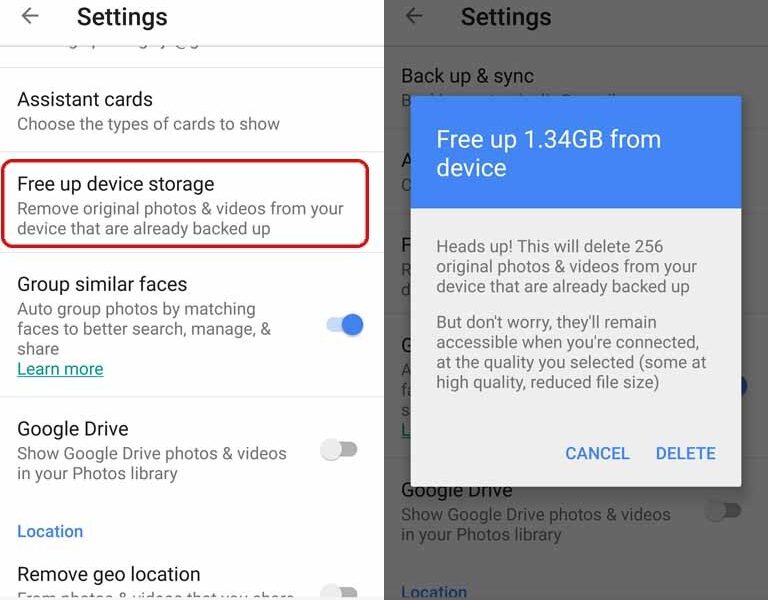

Quick answer (checked October 9, 2026): In Google Photos, Free up space on this device is intended to remove eligible local copies of photos and videos that have already been backed up to Google Photos. It is not the same as selecting images and tapping Delete, which can also remove those images from your Google Photos library. Verify that backup completed, confirm the correct Google Account, and independently protect irreplaceable files before freeing storage.
Check whether Google Photos backup is complete
Open Google Photos, tap your profile picture and look for backup status. If the app says it is still backing up, waiting for Wi-Fi, or has an error, do not assume every recent picture exists in the cloud. Verify a sample of important photos at photos.google.com while signed into the same Google Account. One phone can hold photos from multiple folders, and optional device folders may not all be selected for backup.
Use Free up space on this device carefully
- Open Google Photos on the phone.
- Tap the account profile picture or initial.
- Look for Free up space on this device, sometimes found in Photos settings or storage options depending on app version.
- Review how much local storage the operation proposes to reclaim.
- Proceed only after verifying cloud backup and any additional copies important to you.
Google describes the purpose of the feature in Google Photos Help. The precise screen wording can change by platform. If your device uses an SD card, additional permissions may be required.
Why are the photos still visible in Google Photos?
The Google Photos app can show backed-up images that are no longer stored as full local files on the phone. They appear because you are viewing the cloud library while online. A normal third-party photo gallery may no longer show the same image as a local copy. This is expected after freeing local device storage, not proof that the cleanup failed.
Deleting from Google Photos is different
Be very careful with the Delete action. Google’s Delete photos and videos support page explains how deletion affects items in the Google Photos library and synced devices. If your goal is only to remove a backed-up copy from the phone, use the dedicated free-space function or the explicitly labeled Delete from device option where available. Do not bulk delete from the main photo grid believing it only removes local files.
How to download a cloud photo again
When a backed-up image has been cleared from local storage, open it in Google Photos and use its Download or Save to device option if available. If a copy is already on the device, that option may not appear. Downloading large videos can use cellular data and fill storage again. For an offline trip, download only the albums or individual images you actually need.
What if backup storage is full?
Freeing local phone storage does not increase the Google Account’s available cloud quota. Google Photos, Gmail and Google Drive can share account storage. If the cloud quota is full, new photos may stop backing up even though the device itself has free space. Review your account storage management separately and do not delete the only copy of a file.
FAQ
Will Free up space delete backed-up images permanently?
The feature is designed to remove eligible local copies while retaining existing backed-up items in Google Photos.
Can I still see photos after freeing phone space?
Yes, backed-up images remain accessible in the cloud library when the account has access.
Does freeing device space free my Google Account storage?
No. Local device space and cloud-account quota are separate.
Is tapping Delete in Google Photos the same as Free up space?
No. The delete action can remove items from the shared library; use the dedicated local-storage feature.
Read AVARIXO Internet help for related backup and cloud-storage guides. Sources: Google Photos Help and Google Photos deletion guidance.


