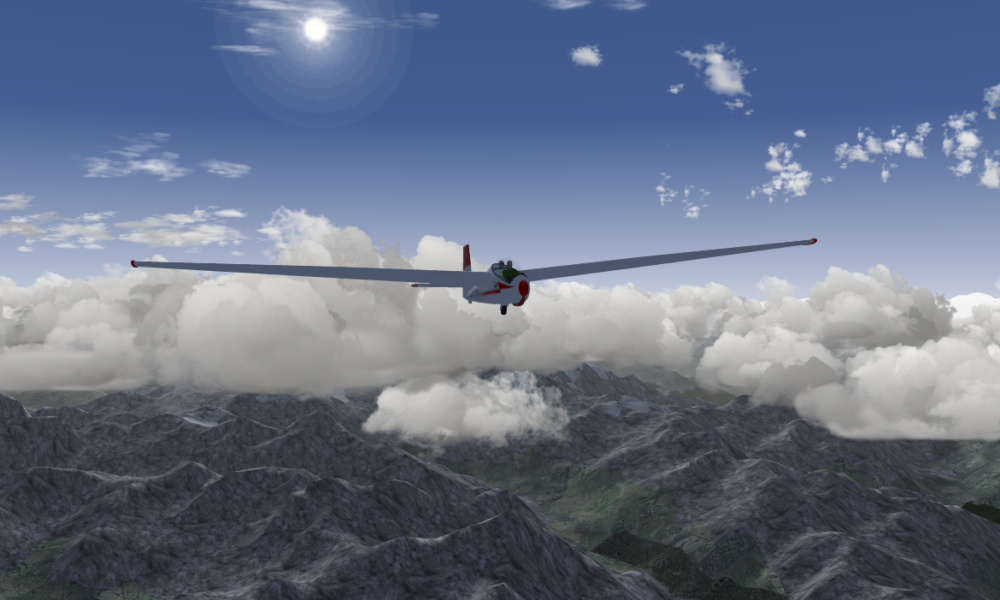

Quick answer (checked October 16, 2026): FlightGear is a free, open-source flight simulation game for Windows, macOS and Linux. It aims to recreate flying aircraft rather than deliver an arcade-style campaign. The latest stable download listed by the project is FlightGear 2024.1.7, released in August 2026. You can download it from the official FlightGear download page without buying a license or subscribing.
If you’re wondering whether FlightGear is worth trying, the short answer is yes for patient beginners who enjoy learning cockpit procedures and flying routes. If you want immediate action, missions or simplified one-button aircraft handling, it is probably not the best match.
What is the FlightGear game?
FlightGear is a community-developed flight simulator. Its emphasis is on aircraft behavior, instruments, weather, airports and the experience of piloting. You can choose aircraft and departure locations and build your own flights. The FlightGear project overview describes uses ranging from entertainment and personal projects to research and education. It is software for simulation, not a substitute for certified flight instruction.
Unlike games centered on earning levels and unlocking battle passes, FlightGear puts the flight itself at the center. Your first meaningful achievement might simply be taxiing safely, taking off without drifting off the runway and returning for a controlled landing.
FlightGear download: Where to get the real game
The safest starting point is the developer’s official download page. Select your operating system, obtain the installer, and read the instructions shown there. Do not confuse a third-party repackage with the publisher’s supported build; some download sites still describe older releases as the latest.
| System | Official stable package (October 2026) | Important note |
|---|---|---|
| Windows | Windows 10/11, x86-64 installer | Windows ARM64 is not listed as supported for this build. |
| macOS | macOS 11 or later, disk image | The project links guidance for some Apple Silicon rendering problems. |
| Linux | x86-64 AppImage | Linux distributions may also offer FlightGear packages in their repositories. |
The official site labels version 2024.1.7 as stable even though its update was published on August 14, 2026. That is a version identifier, not evidence that the download is from 2024. Development or nightly releases exist, but the project warns they can contain rendering and interface problems; use stable builds for a first flight. Official nightly-build warning.
How to start playing FlightGear: your first flight
- Install from the official page. Complete the setup for your operating system. Be prepared for additional aircraft or scenery data to use more storage than the installer alone.
- Open the launcher. Pick an aircraft you can learn on rather than starting in an unfamiliar high-performance jet. The project’s beginner guide recommends the Cessna 172P.
- Select an airport. A runway with straightforward terrain and weather makes a less frustrating first attempt than a mountain airfield or complex city airport.
- Set reasonable controls. You can begin with keyboard and mouse, but a joystick or game controller with appropriately mapped axes may feel more natural. Check input calibration before takeoff.
- Use the built-in tutorial. In the simulator, look for Help > Tutorial. Follow the specific aircraft’s instructions rather than relying on hotkeys memorized from other games.
- Practice in stages. First learn to release the parking brake, taxi slowly and stay centered on the runway. Then rehearse a smooth takeoff and straight-and-level flight before attempting a full traffic pattern.
- Debrief one issue at a time. If you veer during takeoff, check rudder and steering controls. If you stall, review airspeed and control inputs. If a runway disappears, investigate scenery loading instead of assuming the simulator is broken.
The project’s New to FlightGear guide and current stable manual are better training references than random keyboard-shortcut lists. Different aircraft can behave differently, so use the aircraft-specific help.
What can you do in FlightGear?
Learn different aircraft
FlightGear supports a diverse aircraft ecosystem, from small piston-engine airplanes to more complex models. Cockpit systems and flight physics vary with the aircraft model, so a technique that works in one may not transfer directly to another.
Explore airports and scenery
Choose places around the world, try circuits and plan cross-country flights. The quality and completeness of scenery depend on the location and available assets. A first download may not include every airport texture or region you want to visit.
Practice weather, navigation and procedures
After a few basic flights, experiment with visibility and weather, navigation instruments, pattern entries and landing approaches. The fun is in learning to control a situation rather than collecting points.
Try community features carefully
The project documents multiplayer capabilities and a modding ecosystem. These features can add variety, but community aircraft, add-ons and scenery may have their own installation requirements and licenses. Stick to known project sources and compatible versions.
Does FlightGear need a powerful computer?
There is no responsible single FPS promise for every computer. Performance depends on the graphics device, display resolution, rendering settings, weather, scenery and aircraft complexity. The official stable page confirms platform support, but platform support does not guarantee smooth performance on every machine.
For a more forgiving first setup, start at a moderate resolution, choose a less demanding airport, avoid maximum visual settings and test a simple aircraft. Increase detail gradually after checking responsiveness. If you are comparing driver-related troubleshooting steps for games, see AVARIXO’s NVIDIA graphics driver update explainer; confirm your own GPU model before changing drivers.
FlightGear not working? Three things to check
| Problem | Likely next step |
|---|---|
| Long startup or apparent freeze | Give initial aircraft/scenery setup time; check the project’s logs and support guidance rather than repeatedly reinstalling immediately. |
| Water or missing terrain at the tutorial airport | Check scenery availability and scenery-download settings. The beginner guide notes that missing scenery can make a training location appear surrounded by water. |
| Controls do not respond as expected | Verify bindings and calibrate the input device; use the in-game aircraft tutorial for the correct procedure. |
| Unexpected rendering on Apple Silicon | Follow the note linked from the official macOS download section for your version. |
For common installation questions, the community’s FlightGear FAQ is a useful reference. If you need help, specify the exact FlightGear version, operating system, GPU and what happened, rather than saying only that the game crashed.
FlightGear game vs. an arcade flying game
| Question | FlightGear | Typical arcade flying game |
|---|---|---|
| Main goal | Simulate and learn flying procedures | Complete objectives, races or missions |
| Price | Core simulator is free and open-source | Depends on the title |
| Learning curve | Can be steep with realistic aircraft | Often faster to pick up |
| Customization | Project and community aircraft/scenery ecosystem | Depends on what the developer offers |
Frequently asked questions
Is FlightGear really free?
Yes. The project offers free downloads and distributes its core code under the GNU General Public License. You do not need to buy a FlightGear subscription to use the core simulator. Optional accessories or third-party products are separate decisions.
Is FlightGear on phones or consoles?
The official stable download page lists Windows, macOS and Linux desktop packages. It does not list native mobile-phone or console editions of the stable FlightGear simulator.
What version should a beginner download in October 2026?
Use the supported stable version shown on the official page, 2024.1.7 at this review. Avoid nightly builds unless you are specifically testing experimental development.
Can I fly FlightGear without a joystick?
You can begin learning with available keyboard and mouse bindings; a calibrated flight controller can improve the feel of aircraft handling. Check the current manual and each aircraft’s own controls.
Are the screenshots in guides always from the newest version?
No. A screenshot may show an older FlightGear build. For example, the historical in-game glider image associated with this article was made in 2015; it documents the real simulator but does not promise identical graphics or menus in the 2026 stable release.
Bottom line: FlightGear is an unusually accessible way to begin exploring flight simulation because the core software costs nothing. Choose the stable desktop build, start with the Cessna 172P tutorial, and treat early flights as lessons rather than tests of reflexes.