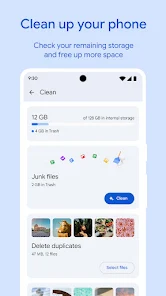

Files by Google is an Android file-management app that can browse local storage, move or copy files and help free space. Google currently lists Android 8.0 or later as the minimum supported version.
Check storage space
Open Files by Google and choose Clean. The app shows used and available storage and, when present, SD-card storage.
Clean junk and temporary files
Files can identify temporary or junk files that may be safe to remove. Review every suggestion before confirming because deleted data may be permanent.
Find duplicate or large files
The Clean tab can surface categories such as duplicates, screenshots, large files or unused apps. Do not delete a file only because it is large; first confirm that another copy exists or that you no longer need it.
Browse and organize files
Use the Browse area to open common categories and folders. You can search, rename, move and copy files. On devices with an SD card, supported files can also be moved between internal storage and portable storage.
Share files safely
Before sharing, verify the file name and content, especially for documents that may contain personal information. Use trusted sharing methods and confirm the recipient before sending.
SD card not showing
If Files by Google cannot see the SD card, check whether Android itself recognizes the card in Settings. If the card is missing there too, remove and reinsert it with the device powered down when appropriate. If Android recognizes it but Files does not, the card format may affect how it appears.
Important deletion warning
Google warns that files removed through cleaning can be permanently deleted. Treat cleanup recommendations as suggestions, not automatic permission to erase everything.
Bottom line
Files by Google is most useful when you review cleanup suggestions carefully, keep important files backed up and use the Browse tools to organize storage rather than deleting items blindly.

Other Articles

Google Play Console: Developer Setup and App Release Basics
Android Auto: Setup, Supported Cars and Connection Fixes