
iPad battery replacement cost depends on the exact model, coverage and service provider. Apple provides model-specific estimates through its repair page, and the final fee can change after the device is inspected.
When an iPad battery may need service
- Battery life has dropped significantly compared with normal use.
- The iPad shuts down unexpectedly even with charge remaining.
- Charging behavior is abnormal after testing another known-good cable and power adapter.
- Battery-health information on a supported model indicates substantial wear.
- The battery or enclosure appears swollen or physically damaged.
If you see swelling, stop using the device and arrange professional service rather than pressing on the display or opening the iPad yourself.
Check battery usage first
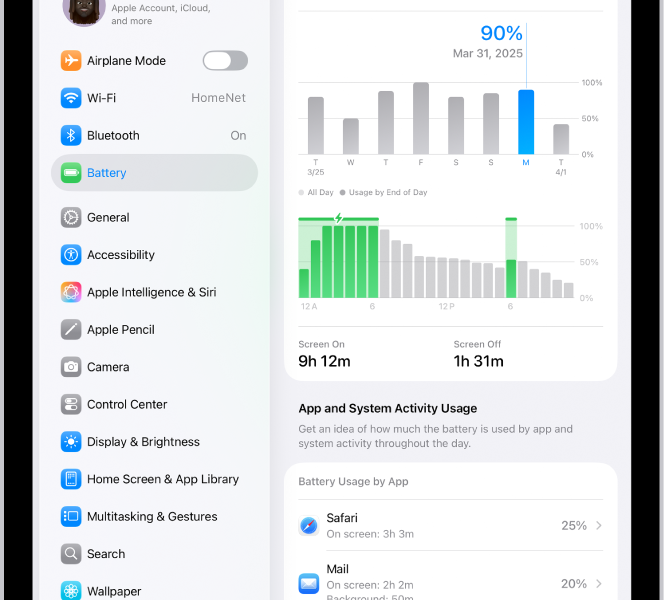
Open Settings > Battery to review usage by app and recent activity. High screen brightness, background activity, games and poor cellular signal can reduce runtime even when the battery itself is still serviceable.
Apple battery service and AppleCare
Apple states that its standard warranty does not cover batteries that wear down through normal use. With an eligible AppleCare plan, battery service can be provided at no extra charge when battery capacity drops below 80% of its original capacity, subject to the plan terms for your device and region.
How much does replacement cost?
There is no single universal iPad battery-replacement price. Apple’s repair page asks for the iPad model and location before showing an estimate. Apple Authorized Service Providers can also set their own service fees.
Service options
Depending on your location and coverage, Apple may offer in-person service, mail-in service or an Express Replacement option with qualifying AppleCare coverage. Availability can depend on parts and region.
Before sending an iPad for repair
- Back up the iPad to iCloud or a computer.
- Check your Apple Account and coverage information.
- Follow Apple’s preparation instructions for service.
- Be prepared to restore from backup if the device is replaced.
Bottom line
Start by checking Battery settings and ruling out high app or display usage. If battery wear is the likely cause, use Apple’s official repair estimator for your exact iPad model and coverage before comparing service options.

Other Articles

New iPad Setup: Apple Account, Wi-Fi and First Settings
How to Lock an iPad Screen and Change Auto-Lock
