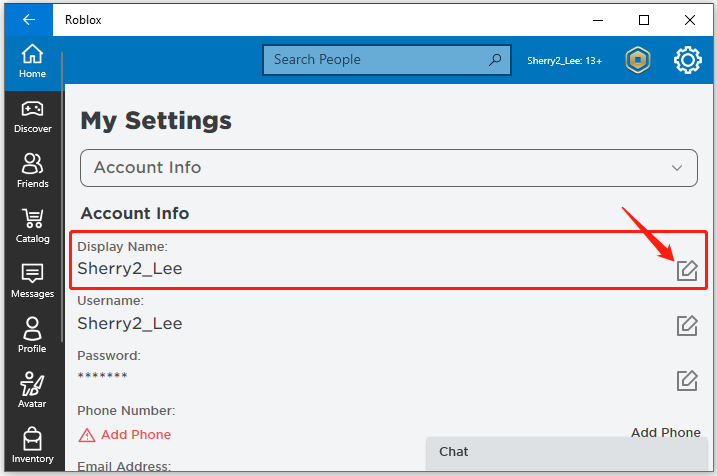

Quick answer (checked October 9, 2026): Roblox lets you change your display name for free from Account Info, usually once every seven days. A display name is not the same as the unique username used to identify your account. Changing a username requires Robux, while your previous usernames remain discoverable. The difference matters when you share a profile, troubleshoot a login, or help someone find you.
Change your Roblox display name step by step
- Sign in to Roblox using your existing account.
- Open Settings. On the web, choose the gear icon; on mobile, use the More menu.
- Select Account Info and find the display name edit control.
- Enter an eligible name and save it.
- Refresh the page and check the profile display. Your original username remains associated with the account.
These steps come from Roblox’s display-name guide. Menu names can change during app updates, so use the desktop site if the mobile layout hides a control.
Display name and username are not interchangeable
Your display name is the name people commonly see in experiences and on parts of your profile. It does not have to be globally unique: someone else can choose the same display name, so it is not reliable proof that an account is yours. Your username identifies your account and must be unique. Roblox also keeps earlier usernames visible through account-related surfaces, so paying to rename a username is not a way to erase a public history.
When sharing your account with a friend, send the exact profile link or verified username instead of relying on a display name alone. This reduces accidental impersonation and confusion when two players have identical display names. If you cannot remember the login identifier, use our Roblox username recovery guide rather than changing the display name.
How often can you change it?
Roblox documents a limit of one display-name change every seven days. If the edit option is unavailable, first check when you last saved a name. Repeated attempts during the waiting period will not remove the cooldown. Roblox filters proposed names under its community rules and may reject names that violate them; the same rules can cause a name to be reset later.
Changing your username instead
If you need to change the unique account username, open Settings → Account Info → Change Username, enter a new available username, confirm your current password, and review the required Robux amount before selecting Buy. Do not assume this paid change also changes your account age, existing purchases, or historical usernames. The official username-change documentation explains those differences.
Why the new name might not appear immediately
Refresh the profile and rejoin an experience where a player list has cached the previous display. If the account page reflects your new display name but a third-party screenshot does not, the screenshot may simply be old. If no save confirmation appeared, verify whether the name was accepted or whether the seven-day limit was reached. Avoid offering your password to websites that promise instant unlimited changes.
Privacy and safety: avoid lookalike accounts
The ability to reuse display names is convenient but makes impersonation easier. When trading, collaborating on a game, or contacting support, compare the username and profile URL, and never accept screenshots as sufficient ownership evidence. For security settings, read our Gaming support guides and use official Roblox account controls.
FAQ
Is changing a Roblox display name free?
Yes. Roblox’s supported display-name edit is free, unlike the unique username-change process.
Can two players have the same display name?
Yes. Check the unique username or profile URL to tell their accounts apart.
Does a new display name change my login?
No. It changes how the account is displayed, not the underlying account username.
Can I change it every day?
No. Roblox documents a seven-day interval between display-name changes.
Sources: Roblox display names and Roblox usernames. Reviewed October 9, 2026.