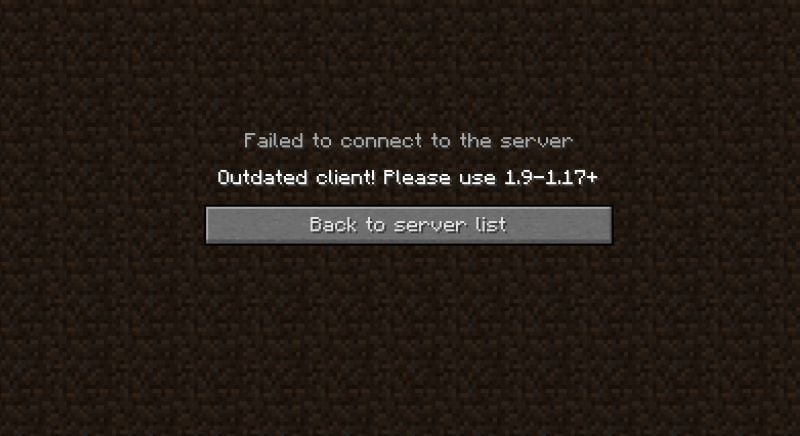

Quick answer (checked October 9, 2026): An ‘Outdated Client’ or ‘Outdated Server’ message usually means Minecraft versions do not match what the multiplayer server or Realm expects. First identify whether you are running Java Edition or Bedrock Edition. Update the correct game, restart it, and confirm that the other side of the connection is on a compatible version. Do not download unverified installers or replace saved worlds as a first fix.
What does Outdated Client mean?
An outdated client is the copy of Minecraft you are launching. If a server or Realm expects a newer protocol and your game has not updated, the two may not communicate. An ‘Outdated Server’ error commonly means the server side needs to catch up with the version your game is using, or that you selected the wrong version in a Java launcher. Exact error text varies across editions and servers, so do not assume every connection error is caused by a version mismatch.
Check which Minecraft edition you are using
Minecraft Java Edition and Bedrock Edition are not normally interchangeable for multiplayer. Java is common on Windows, macOS and Linux computers; Bedrock runs on Windows and many consoles and phones. The supported version, edition, and server type must align. A Java-only multiplayer server will not simply become a Bedrock server because both devices have the latest software installed.
Update Minecraft on Bedrock devices
On supported phones and consoles, open the platform’s official game-store or updates area and install the available Minecraft update. On Windows Bedrock, use the store or launcher associated with your installation. Restart the game fully after the update. Minecraft’s official multiplayer troubleshooting recommends enabling automatic updates and asks that everyone joining a world use a compatible current version.
Java Edition: choose the right launch profile
Open the official Minecraft Launcher and inspect the selected installation. The ‘latest release’ option is appropriate for many current servers, but a privately hosted Java server may intentionally run a particular older release or modded version. A snapshot, preview or heavily modded profile can fail against an otherwise working server. Ask the server owner which edition and version they support before deleting mods or altering world data.
What should the server owner do?
If many players get ‘Outdated Server’ at the same time, the host should check its release version and maintenance schedule. Back up server world files before installing a new server version. Some plugins and mods need their own compatible updates. For Realms, allow official update rollout to finish and check that client versions are supported rather than assuming a preview build will connect to a production Realm.
If versions match but multiplayer still fails
Check account permissions, network conditions, subscription requirements where applicable, and the multiplayer privacy settings for the platform. On a child’s account, the Gaming guides explain why family permissions may affect online play. Minecraft’s official guide separates version mismatches from ‘Multiplayer is disabled’ and other account issues. Treat those as different troubleshooting paths.
Save worlds before changing installations
Worlds created on a newer version may not work correctly in a much older build. Avoid downgrading a valuable save merely to join an old server. Use a backup copy for experiments, and save Realms world downloads before major server changes. Do not assume uninstalling Minecraft always leaves every local world untouched on all platforms.
FAQ
Should I download an old Minecraft APK to fix Outdated Client?
No. Use official platform update methods; unknown installers carry security and account risks.
Does Java Edition connect to a Bedrock Realm?
Normally no. Edition compatibility matters independently of version numbers.
Why does only one multiplayer server give the error?
That server may run a different Minecraft version from your currently selected client.
Will updating delete my saved worlds?
Normal official updates are designed to preserve progress, but making a backup first is prudent.
Sources: Minecraft multiplayer connectivity and Minecraft edition comparison.

Other Articles