
Minecraft Java Edition 26.4 Snapshot 4 is a major frozen-biome test build centered on the new Ice Caves biome, the Frostbite zombie variant, Ice Crystals, Icicles, Ice Balls and a new Freezing effect. It also updates the Friends interface, player reporting and parts of the debug overlay.
The snapshot arrived on October 6, 2026 and is available through the Minecraft Launcher for Java Edition players who enable snapshots. As with every snapshot, these features are unfinished and can change before they reach a stable release.
Minecraft 26.4 Snapshot 4 at a glance
| Area | What’s new |
|---|---|
| World generation | Ice Caves beneath colder Overworld biomes |
| Blocks | Ice Crystals and Icicles |
| Mob | Frostbite zombie variant |
| Status effect | Freezing |
| Item/projectile | Ice Ball |
| Social UI | Redesigned Friends list and Other Players screen |
| Technical | Data Pack version 123.0 and Resource Pack version 100.0 |
Ice Caves are the headline addition
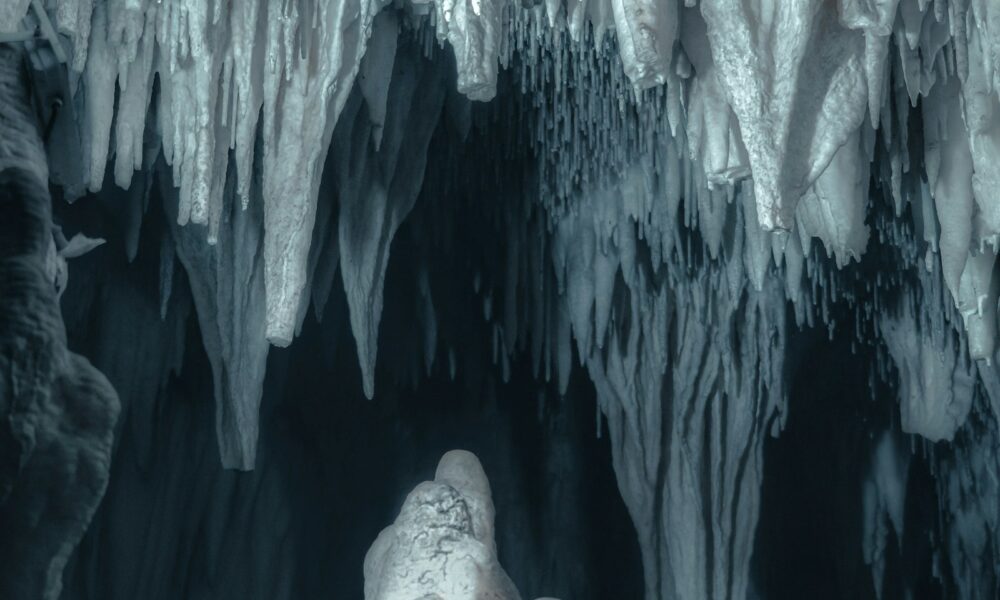
Ice Caves are a new underground biome that generates beneath colder Overworld biomes. The caves use Packed Ice and Calcite as major visual materials, with Icicles hanging from ceilings and larger formations appearing above and below. Snow patches can appear on the floor, while ores generate inside pockets of Stone and Deepslate.
The biome is more than a visual variation. Strays and the new Frostbite mob can spawn there, and Ice Crystals may generate on the cave floor. That gives Ice Caves their own combat loop, environmental hazards and collectible blocks rather than functioning as a simple reskin of an existing cave.
Players who want to test the feature should create a new snapshot world or travel into previously unexplored chunks. World-generation features do not retroactively rebuild already generated terrain.
What are Ice Crystals?
Ice Crystals are crystal-like blocks that share some visual and placement behavior with Amethyst Clusters. They emit light, can be placed in multiple directions and break if their supporting block is removed. Their glow makes them useful for atmospheric builds, while their natural generation gives players another reason to explore Ice Caves.
Because Snapshot 4 is experimental, exact light values, generation rates and block interactions can still be tuned in later snapshots.
How Icicles work
Icicles belong to the same broad family of pointed environmental blocks as Dripstone and Sulfur Spikes. Naturally generated downward-facing Icicles can grow up to five blocks long in suitable dark conditions. They do not grow in the Nether.
For builders, the interesting part is that Icicles are not only scenery. Their growth rules and support-block behavior create possibilities for frozen caverns, winter structures and custom adventure maps. For survival players, their presence also makes the new caves easier to identify at a glance.
The Frostbite is a new freezing zombie
The Frostbite is a cold-biome zombie variant with both melee and ranged behavior. At range, it can throw Ice Balls. In close combat, its attacks apply the Freezing effect. Frostbites are adapted to the cold: they can stand on Powder Snow and are immune to freezing.
Regular Zombies and Husks can transform into Frostbites after spending enough time in Powder Snow. Frostbites can also transform back into regular Zombies if left underwater long enough. That conversion loop gives players a potential way to create controlled Frostbite encounters for testing or farming, although Mojang can still rebalance the timings and drops.
Current Snapshot 4 coverage reports Rotten Flesh and Ice Balls among Frostbite drops.
Freezing effect explained
The new Freezing mob effect gradually chills affected players, causing shaking and eventually damage in a way similar to Powder Snow exposure. Leather Armor provides protection from freezing damage, although it does not prevent the status effect from being applied or instantly remove it.
One of the most important combat details is that mobs vulnerable to Freezing take significantly more damage while affected. That could make Freezing-based setups useful in combat if the mechanic survives testing in a similar form.
Ice Balls, potions and arrows
Ice Balls are projectiles used by Frostbites and can also enter the player’s toolkit. They deal light impact damage and knockback, then break with a particle and sound effect.
The snapshot also introduces a potion path around the new mechanic. Ice Balls can be used in brewing to create Freezing-related potions, and players can craft Arrows of Freezing from a Lingering Potion of Freezing surrounded by arrows.
The combination of ranged Ice Balls, Freezing potions and tipped arrows means the mechanic is designed to work both as an environmental threat and as a player-controlled combat tool.
Friends list and social changes
Snapshot 4 is not only about the frozen biome. The social interface has also been reworked. The old Social Interactions screen is replaced by an Other Players screen, while the Friends list gets updated design elements, search and sorting.
- The profile-name field can be used as a search box.
- A sorting control can switch between online-first and alphabetical ordering.
- Clicking a player’s icon opens Player Options.
- The previous Remove Friend action has moved into Player Options.
These changes are easy to overlook beside the new biome, but they matter for multiplayer players because they make large friends lists and player-management tools easier to navigate.
Player reporting and debug-overlay changes
The reporting flow now handles saved drafts more clearly, including warnings when quitting could discard an unfinished report. On the technical side, the debug overlay gains new chunk-status controls and the lightmap visualization becomes configurable.
The build also advances the technical version numbers to Data Pack version 123.0 and Resource Pack version 100.0, which matters to map makers and resource-pack creators testing compatibility.
Important bug fixes
The build addresses issues ranging from pet teleportation through Nether portals to Vulkan frame-rate limits, menu text problems and Superflat crashes. Snapshot players should still expect instability because these builds exist specifically to expose unfinished behavior before a wider release.
How to install Minecraft 26.4 Snapshot 4
- Open the official Minecraft Launcher.
- Select Java Edition.
- Open the Installations tab.
- Enable snapshots if they are hidden.
- Create or select an installation using the latest snapshot.
- Back up any world you intend to test before opening it in the snapshot.
Should you use your main world?
It is safer not to. Snapshot worlds can become incompatible with older versions, and experimental world-generation changes can have lasting effects. The best approach is to test Snapshot 4 in a separate world or a backed-up copy.
What should players test first?
If you only have a short session, focus on the new content that is most likely to generate useful feedback: find an Ice Cave, compare Frostbite ranged and melee behavior, test Leather Armor against Freezing, try Ice Balls and potion interactions, then check the Friends and Other Players interfaces. Those areas contain the biggest user-facing changes in this build.
Frequently asked questions
Is Snapshot 4 for Bedrock Edition?
No. Snapshots are Java Edition test builds. Bedrock Edition uses Preview and Beta builds for experimental updates.
Where do Ice Caves generate?
They generate underground beneath colder Overworld biomes.
Can Frostbites spawn naturally?
Yes. They can appear in Ice Caves, and regular Zombies or Husks can also convert after exposure to Powder Snow.
Can Leather Armor stop Freezing?
Leather Armor protects against freezing damage, but it does not stop the effect from being applied.
Will these features definitely ship unchanged?
No. Snapshot features are experimental. Mojang may change generation, balance, recipes, visuals or even remove a feature before a stable release.
Sources and related reading
Current Snapshot 4 details were cross-checked against fresh patch coverage, including Times of India’s Snapshot 4 breakdown.
For more current game updates, visit AVARIXO’s Gaming section or our Gears of War: E-Day launch guide.

Other Articles