
Quick answer: To enable iMessage, open iPhone Settings, find Messages and switch on iMessage. Activation requires a suitable network connection and may involve your phone number or Apple Account.
Use this step-by-step guide to understand the main choices, avoid common errors and check what applies to your device or game version. Interfaces and mechanics can change after updates.
Turn on iMessage
Open Settings and navigate to Messages; on some iOS versions, app-specific settings are grouped under Apps. Enable iMessage and allow time for activation. Confirm you are signed into the intended Apple Account.
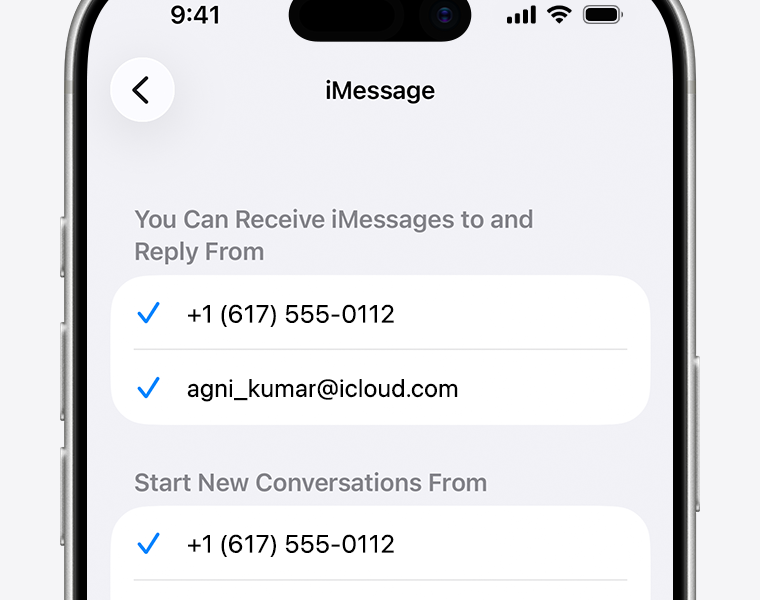
Check Send & Receive
Review the addresses and phone numbers selected under Send & Receive. Choose which one starts new conversations if the option is offered. A wrong selection can make messages appear from an unexpected email address.
Understand blue versus green messages
iMessage conversations between compatible Apple devices typically appear in blue. Green can indicate SMS, MMS or another supported messaging path depending on settings and iOS version. Color alone does not prove that a message failed.
Fix waiting for activation
Check mobile service, internet access, date and time settings, and whether your carrier supports the required activation messaging. Restart the device and consult Apple’s current troubleshooting instructions if activation remains stuck.
Protect message privacy
Use a device passcode, keep iOS updated and review which devices are signed into your Apple Account. Do not share verification codes with someone offering to activate iMessage for you.
Checklist before you finish
- Turn on iMessage: Open Settings and navigate to Messages; on some iOS versions, app-specific settings are grouped under Apps.
- Check Send & Receive: Review the addresses and phone numbers selected under Send & Receive.
- Understand blue versus green messages: iMessage conversations between compatible Apple devices typically appear in blue.
- Fix waiting for activation: Check mobile service, internet access, date and time settings, and whether your carrier supports the required activation messaging.
Frequently asked questions
Does iMessage require Wi-Fi?
It can use a supported internet connection, including cellular data.
Can iMessage activation take time?
Yes. Follow Apple’s official guidance if it remains pending.
Official documentation
For current features and account requirements, consult the official documentation. Avoid unofficial installers, account-sharing requests and outdated shortcuts.

Other Articles