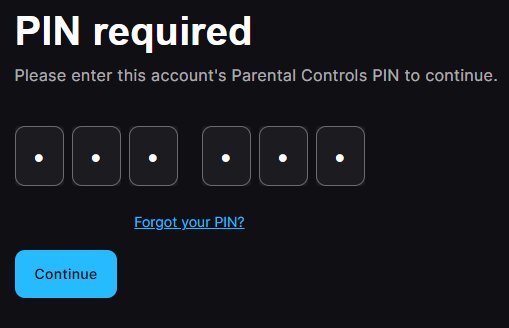

Checked October 9, 2026. The Fortnite Parental Controls PIN protects changes to family-managed settings. Forgetting it does not require deleting your child’s Epic Games account or reinstalling Fortnite. The legitimate recovery route goes through Epic Games and the email associated with the parent or guardian’s settings.
Quick answer: Open the official Epic Games parental PIN recovery process, choose the forgotten-PIN option and follow the email verification instructions for the correct parent or account. If you cannot access that address, use Epic Support’s account recovery guidance.
Why identifying the exact issue matters
Check the account and platform first; an error affecting one mode, device or player is not automatically evidence of a universal service outage. Use the official provider instructions below and test one safe change at a time.
Identify whether the game is requesting a parental PIN
A parental-control PIN prompt is different from a two-factor authentication login code, a console passcode or a device screen-time restriction. Read the wording in Fortnite carefully. If the restriction came from PlayStation family management, Xbox Family Settings or Nintendo parental controls, Epic’s PIN reset will not change that separate platform rule.
Use Epic’s official forgotten-PIN process
Open the Epic Games parental-controls page through the account settings or official recovery support page. Look for Forgot Your PIN and follow the account-specific instructions. The exact wording may differ between the web account, game menu and regional versions. A trusted parent should perform the recovery rather than sharing verification links with a child or a third party.
Check the correct parent email inbox
When Epic sends a reset or verification email, it goes to the address registered for the relevant parental controls. Check spam, verify that you are checking the correct inbox and allow for delivery delay. Do not forward reset messages into public chats. If the contact address is obsolete, resolve access through support rather than trying somebody else’s mailbox.
Review restrictions after recovery
Once the PIN has been reset, revisit the permissions you originally meant to control: social communication, spending, account connections and age-appropriate experiences as offered by the current interface. Epic and console-maker restrictions can coexist. Lowering one setting does not necessarily override a separate platform or local device restriction.
Handle a managed child account carefully
If a child claims the game is broken, first establish which action is blocked and which product is enforcing the rule. A request to talk to strangers, make a purchase or open a restricted mode should be assessed against your family’s rules. Resetting the PIN should restore legitimate administration, not bypass the safety decision.
Escalate only through verified Epic channels
If the reset email never arrives, account ownership is disputed or the wrong guardian address is shown, use Epic’s own support flow. Provide the error wording and platform but withhold verification codes, passwords and identity documents unless you are submitting them to a genuine official secure form.
Frequently asked questions
Is my Fortnite parental PIN the same as my 2FA code?
No. A parental PIN manages family settings; a two-factor code confirms account sign-in.
Can reinstalling Fortnite reset the parental PIN?
No dependable official guidance treats reinstalling as a parental-settings recovery method. Use Epic’s account-based reset procedure.
What if PlayStation family restrictions remain?
Those restrictions are managed separately through PlayStation’s parental-control tools and must be reviewed by the family manager.
Official sources and further reading
Reference: official Epic Games support. Read also: related AVARIXO Fortnite coverage. Check the official help page again if Fortnite changes its menus or eligibility policies after this article was reviewed.