Quick answer: PTB stands for Public Test Build. It is a pre-release channel Discord uses to test updates or features before or alongside wider stable releases. It is not a paid premium tier and does not automatically unlock Discord Nitro,
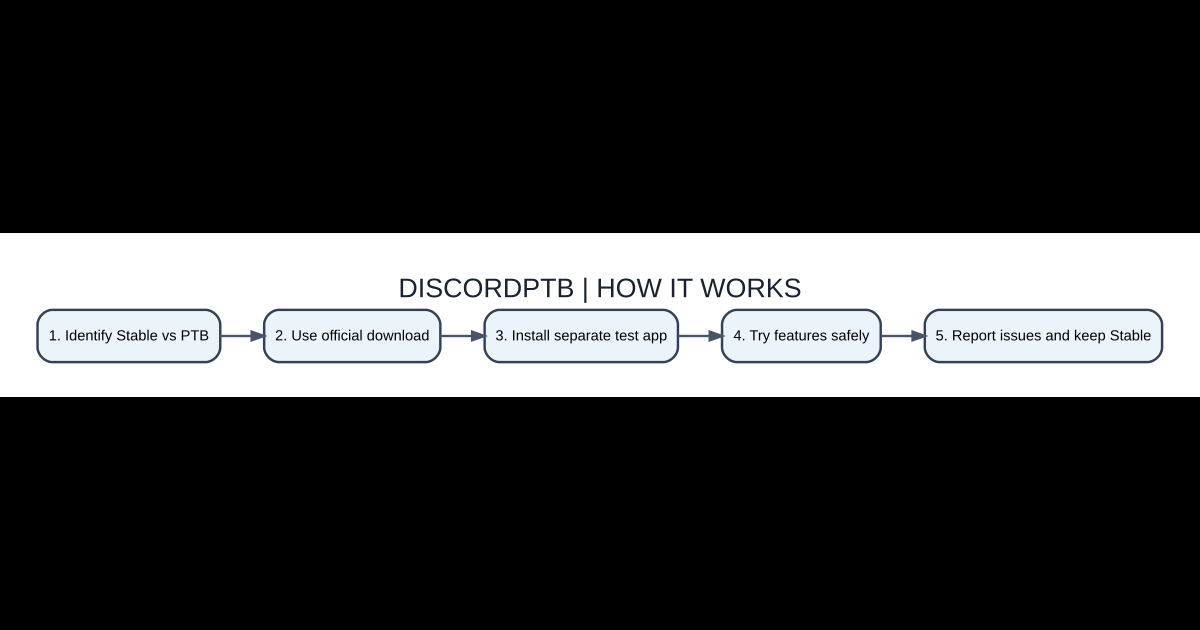
Quick setup steps
- Identify Stable vs PTB
- Use official download
- Install separate test app
- Try features safely
- Report issues and keep Stable
What Discord PTB actually means
PTB stands for Public Test Build. It is a pre-release channel Discord uses to test updates or features before or alongside wider stable releases. It is not a paid premium tier and does not automatically unlock Discord Nitro, extra server boosts or private moderator privileges. A feature seen in a PTB screenshot may still be changed or removed before reaching the stable app. PTB is best understood as software for testing rather than the most reliable daily communication client.
Stable, PTB and Canary compared
Discord Stable is the ordinary main client intended for routine use. PTB receives some changes earlier for broader testing, while Canary is an even more experimental channel used for rapidly developing features. The exact update cadence can vary. A user who needs dependable voice calls for work or gaming may prefer Stable and keep PTB only for exploring changes. Running experimental code increases the chance of interface changes and temporary bugs, not automatically the quality of your connection.
How to install the genuine PTB application
Get PTB from Discord’s legitimate download or testing information, choosing the package appropriate to your operating system. Read whether it installs separately from Stable on your platform. Avoid web pages offering an unofficial PTB ‘Nitro unlocked’ installer. After installation, sign into the correct account using the normal secure login method. Do not transfer tokens manually or paste session data into another application just because a guide says experimental features require it.
What to test responsibly
Try a specific feature or problem you care about rather than changing every setting at once. Record the app version, operating system and steps needed to reproduce a bug. If a screen-sharing option behaves differently in PTB, compare Stable to confirm whether the issue is unique to the test build. Avoid relying on an unannounced feature for an important live presentation. Keep basic account-security settings enabled in both versions.
Potential for bugs and data confusion
A test build can crash, display unfinished translations or handle hardware differently from the stable release. Not every issue indicates a damaged Discord account. Quit both applications, restart the affected one and check known issues or support guidance. Be careful when deleting cache or app data: confirm which installation the files belong to before removing anything. Test microphone routing separately, especially when two Discord clients can request access to the same headset.
When to return to Stable
Use Stable if you mainly need reliable communication, if a PTB feature disappears, or if work policies forbid experimental applications. Uninstall the PTB application through normal operating-system controls if you no longer want it. Your Discord account and server memberships are server-side, not supposed to depend on keeping an experimental desktop binary. Don’t assume that cancelling a PTB download deletes Discord itself.
Options and distinctions
| Item | What it does | When important |
|---|---|---|
| Discord Stable | Regular released client | Daily communication |
| Discord PTB | Public Test Build | Feature testing |
| Discord Canary | More experimental channel | Early testing |
| Discord Nitro | Paid subscription | Unrelated to PTB |
Frequently asked questions
Does PTB give free Discord Nitro?
No. It is a testing build, not a subscription unlock.
Is PTB always more up-to-date?
It can receive experimental updates sooner, but release channels differ.
Can I keep Stable installed?
Supported installation details vary; PTB is commonly used alongside Stable.
Is PTB ideal for work calls?
Stable is generally a safer default for reliability.
Related AVARIXO guides
See our Chrome troubleshooting guide, Discord browser explanation, and Windows 11 recovery guide as appropriate. Software release channels and UI elements can change, so review current official product documentation before making risky system changes.

Other Articles

Google Chrome for iPhone: Install, Make Default and Sync Bookmarks
HammerTime Discord Timestamps: Local Time Codes and Formatting Guide