

Quick answer: It Takes Two is a story-driven cooperative adventure from Hazelight Studios where two people play as Cody and May. The Steam release supports local split-screen, online co-op and Steam Remote Play Together, while its Friend’s Pass system lets an eligible friend join a full game hosted by an owner. The online Steam experience involves an EA Account, and the game is designed for exactly two players rather than solo play.
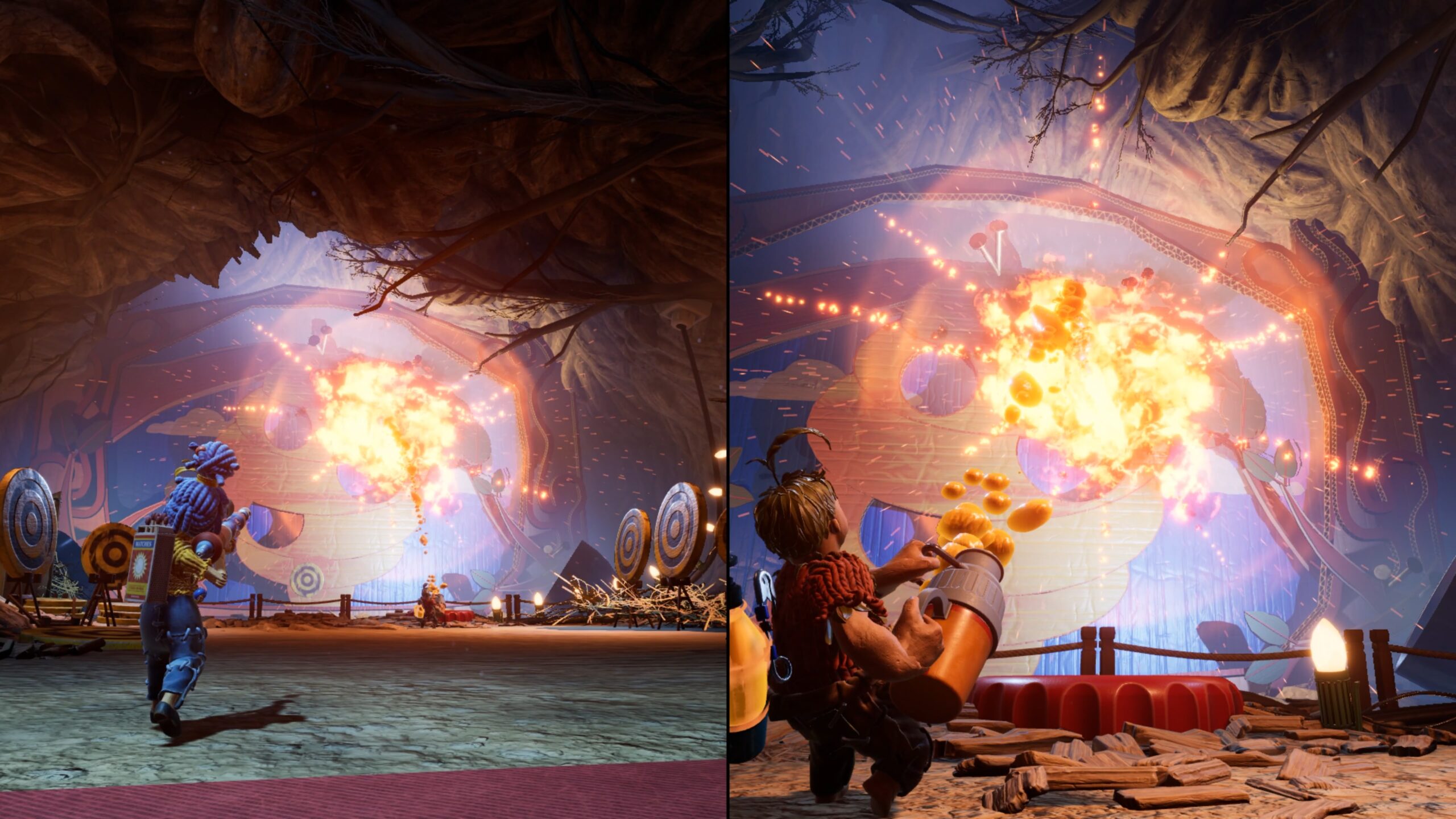
it takes two steam at a glance
| Feature | What to know |
|---|---|
| Developer | Hazelight Studios |
| Publisher | Electronic Arts |
| Steam release | March 25, 2021 |
| Players | Two, with cooperative gameplay required |
| Play styles | Local shared-screen and online |
| Friend’s Pass | Eligible second player can join an owner for free |
| Online requirements | EA Account linking and connection terms |
What is It Takes Two?
It Takes Two is a cooperative action-adventure about Cody and May, two parents whose relationship has reached a difficult point. The game uses imaginative environments and different character abilities to tell a story that two players must experience together. It is not a single-player game with an optional friend-controlled companion. Nearly every major challenge is built around coordination, whether the players are manipulating an object, moving through a platforming area or responding to a changing boss pattern. You cannot simply ignore one character and expect the full story to progress normally.
Does only one person need to buy the game?
The Friend’s Pass system is designed so that a player who owns the full game can invite an eligible friend who uses the free Friend’s Pass application. This can reduce the total cost for a pair, but it depends on supported platforms, accounts, editions and current service conditions. The free Friend’s Pass is not an unlimited stand-alone copy that always lets two non-owners complete the whole game together. Read the platform-specific Friend’s Pass description before making plans based on a screenshot that may omit eligibility rules.
How to use Friend’s Pass on Steam
Have the game owner install and launch their purchased copy, while the invited player obtains the appropriate official Friend’s Pass application for their supported platform. Then follow the in-game invitation process and any account-linking requirements. If the invitation fails, verify that both installations are current and that they are using a supported platform pairing. Do not use a fake Friend’s Pass installer from a random website, since the official publisher provides the required client and instructions. The owner should initiate the full-game session so the second player can access the adventure under the proper entitlement.
Local couch co-op versus online play
Local play displays both characters on one machine or screen and requires appropriate input devices; online play connects people from separate locations. Steam also lists Remote Play Together, which may allow local multiplayer input to be streamed through a compatible host setup. These are different connection methods and may behave differently with controllers, network quality and account services. Decide whether you will be on the same couch or using separate computers before troubleshooting the wrong feature. If your main goal is couch co-op, test both controllers at the title screen.
Why the EA Account requirement matters
The Steam listing identifies an EA Account requirement for online play and supports account linking with Steam. It is important to distinguish a purchase license from an online sign-in identity. A player may own the game in Steam but still need to complete the publisher’s account process to join certain sessions. If an invitation is blocked, verify the status of account linking, online permissions and security settings before reinstalling everything. Do not share passwords or verification codes with the other player; each person should sign in to their own account through legitimate client prompts.
Can Steam play with a friend on another platform?
Do not assume universal cross-platform multiplayer simply because the game has PC, PlayStation, Xbox and Nintendo editions. Friend’s Pass and online compatibility can depend on the specific platform family or generation. EA’s product terms and the current invitation interface should be checked for the exact pair of devices. A Steam player and someone on a console may not have the same entitlement path as two compatible PC accounts. Ask which systems both people own before purchasing the full game solely because a promotional page says ‘play with a friend’.
How the two characters cooperate
Cody and May receive distinctive tools at different stages, and many puzzles require one player to create an opening while the other performs a complementary action. Communication matters because a player may have the necessary view or ability but not understand what their partner can see. Describe what changed after you activate a mechanism rather than just pressing random buttons. A simple conversation like ‘I can hold this switch; can you cross now?’ often solves a room faster than both players attempting unrelated actions.
Movement, camera and split-screen comfort
The game includes platforming sequences with jumps, timed actions and spatial puzzles. A new player should experiment with camera sensitivity and button layout in a calm area before a fast-moving section. On a shared display, the split-screen view means each player has less screen space, so sitting at a comfortable distance can matter. If one person finds the game difficult, offer time to practice instead of demanding perfect timing immediately. The level design frequently changes the mechanics, which keeps the game fresh but requires both players to adapt.
What if one friend is new to games?
It Takes Two can be welcoming because each challenge encourages collaboration, but that does not mean every sequence is effortless. Give the less experienced player time to learn movement and to describe what they see. Avoid taking control of both characters in frustration; doing so defeats the purpose of the cooperative design. The more experienced player can explain an intended objective without giving a detailed list of every button press. Celebrate small successful moments and use a slower pace when the chapter introduces unfamiliar mechanics.
Are there separate puzzles and minigames?
Alongside major story challenges, the game includes optional competitive moments and minigames where the two characters can play against each other. These are not the main campaign’s goal, but they can provide fun breaks between cooperative tasks. Some are easy to miss if both players rush forward. When exploring, look around for inviting side activities and decide whether the group wants to try them. It is not necessary to clear every optional challenge during the first playthrough to experience the story.
Story progression and chapter selection
It Takes Two is structured around connected chapters and changing gameplay mechanics. The characters’ abilities can be dramatically different in each environment, so a guide written for one section may not describe how the next works. The story is emotional at times despite its colorful presentation, with themes about communication and relationships. Avoid spoilers if you want the narrative surprises to remain intact. Once you are comfortable with the controls, let the scenes unfold naturally rather than trying to follow a chapter checklist for every minute.
PC performance and controller troubleshooting
The game supports full controller input through Steam according to its product listing, but exact controller support can vary by device and connection method. If one player cannot move, check that the correct input device is assigned and that any Steam Input or Remote Play settings are configured appropriately. For online sessions, a stable connection is important because delayed actions can disrupt co-op timing. If performance is poor, reduce graphics settings and compare your computer with current system requirements. Restarting the clients is often safer than installing unknown third-party ‘co-op unlocker’ utilities.
Is it available through EA Play?
EA advertises the game through certain EA Play offerings and store channels, but subscription availability and access terms can change. Do not assume that buying EA Play on one platform gives you an unlimited permanent license on another. Similarly, subscription access may stop when an eligible plan ends. Check the current game listing in the exact store where you intend to play. The Friend’s Pass rules concern an eligible owner’s active game access, not a separate promise that every subscription includes two permanent copies.
Steam Remote Play Together versus Friend’s Pass
Remote Play Together is a Steam streaming feature that shares a host’s local multiplayer session with remote input devices where supported. Friend’s Pass is an officially distributed companion application with its own entitlement and account process. The two options are not interchangeable troubleshooting steps. If you have a strong host computer and a suitable controller setup, Remote Play Together may be convenient. If each player has a capable PC and the appropriate official application, Friend’s Pass can provide a different route. Read both platform instructions before deciding which to use.
How to avoid common invitation errors
Check that the full-game owner is hosting, the other player has the correct app or supported invitation route, both players are signed in to the required accounts and firewalls or network settings are not blocking the relevant connection. Confirm there is no platform mismatch, and try updating both installations before deleting them. If online account prompts recur, follow the official EA account-linking steps rather than entering sensitive credentials on third-party websites. Many connection problems come from configuration rather than an inherently broken purchase.
The best way to begin as a pair
Agree on a regular time to play, test voice communication and controller assignment, and start with the early chapters rather than jumping directly to a late-game streamer’s video. Decide whether you want to search every room for optional minigames or move more quickly through the story. When a puzzle seems unclear, have each person describe the tools their character possesses. The game is designed around cooperation, and a patient approach usually produces a better experience than rushing ahead while the other person struggles.
Official references and related recommendations
The Steam It Takes Two listing describes the co-op-only design, controller features, Steam Remote Play and EA Account terms. EA’s official game page explains Friend’s Pass and the story. For a different two-player puzzle experience, Portal 2 offers its own dedicated cooperative mode; for platform choice questions, compare our couch versus online co-op overview.
Frequently asked questions
Can I play It Takes Two by myself?
No. It is specifically built as a two-player cooperative adventure.
Does the second player always need to buy the full game?
Friend’s Pass can allow an eligible friend to play with an owner, subject to the current platform rules.
Does Steam require an EA Account?
The Steam product listing identifies EA Account requirements for online play.
Does it support local split-screen?
Yes. It has local co-op and split-screen play.
Is Steam Remote Play Together the same as Friend’s Pass?
No. Remote Play Together streams a local session; Friend’s Pass is a separate official application and entitlement arrangement.

